

Every payroll team has a version of the same story. The run locks Wednesday at noon, and at 11:40 someone finds a batch of timecards with missing punch-outs, a manager who never approved 14 employees, and a new hire who somehow logged 92 hours because the clock double-counted a shift. Now three people are in a spreadsheet fixing entries by hand while the clock runs down.
The problem almost never is that exceptions exist — they always will. The problem is that nobody decided when an exception has to be resolved, who owns it, or what happens if it isn't fixed before the deadline. Timecard exception management is really about wiring your pay-cycle deadlines to resolution windows so that a missing approval on Monday doesn't turn into a manual patch on Wednesday night.
This post is narrow on purpose. It covers mapping pay-cycle gates to resolution SLAs, escalation timing, and the reconciliation checks that catch the exceptions your clock system quietly lets through.
The real failure: your pay cycle has deadlines, your exceptions don't
Most payroll calendars are extremely precise about cutoffs. Time entry closes at X. Manager approval due by Y. Payroll locks at Z. Direct deposit file transmits Thursday morning.
But the exception side has no matching clock. When a timecard fails a validation — missing punch, unapproved hours, overtime spike, a terminated employee still showing time — there's usually no defined answer to "by when must this be resolved, and if it isn't, who gets pulled in?"
So exceptions pile up in a passive queue. They sit. Nobody's on the hook for them until the deadline is basically already here. Then it's a scramble, and the scramble is what produces the manual fixes that cause errors, which then produce off-cycle corrections the following week.
This usually happens because the timekeeping system, the approval workflow, and the payroll lock are three separate deadlines that were never tied together. Time entry closes Monday night. Approvals are "due" Tuesday but not enforced. Payroll locks Wednesday. That gap between Monday and Wednesday is where every last-minute fix lives — completely undefined territory.
Map the cycle backward from the lock
Start by working backward from the hard deadline — the moment payroll locks and you can no longer change anything without an off-cycle correction — and assign every exception type a resolution window before that point.
Eliminate payroll errors and delays.
Payexly streamlines every payroll cycle ensuring accuracy and compliance.
- Automated payroll processing
- Real-time tax compliance
- Benefits & deductions management
No credit card required
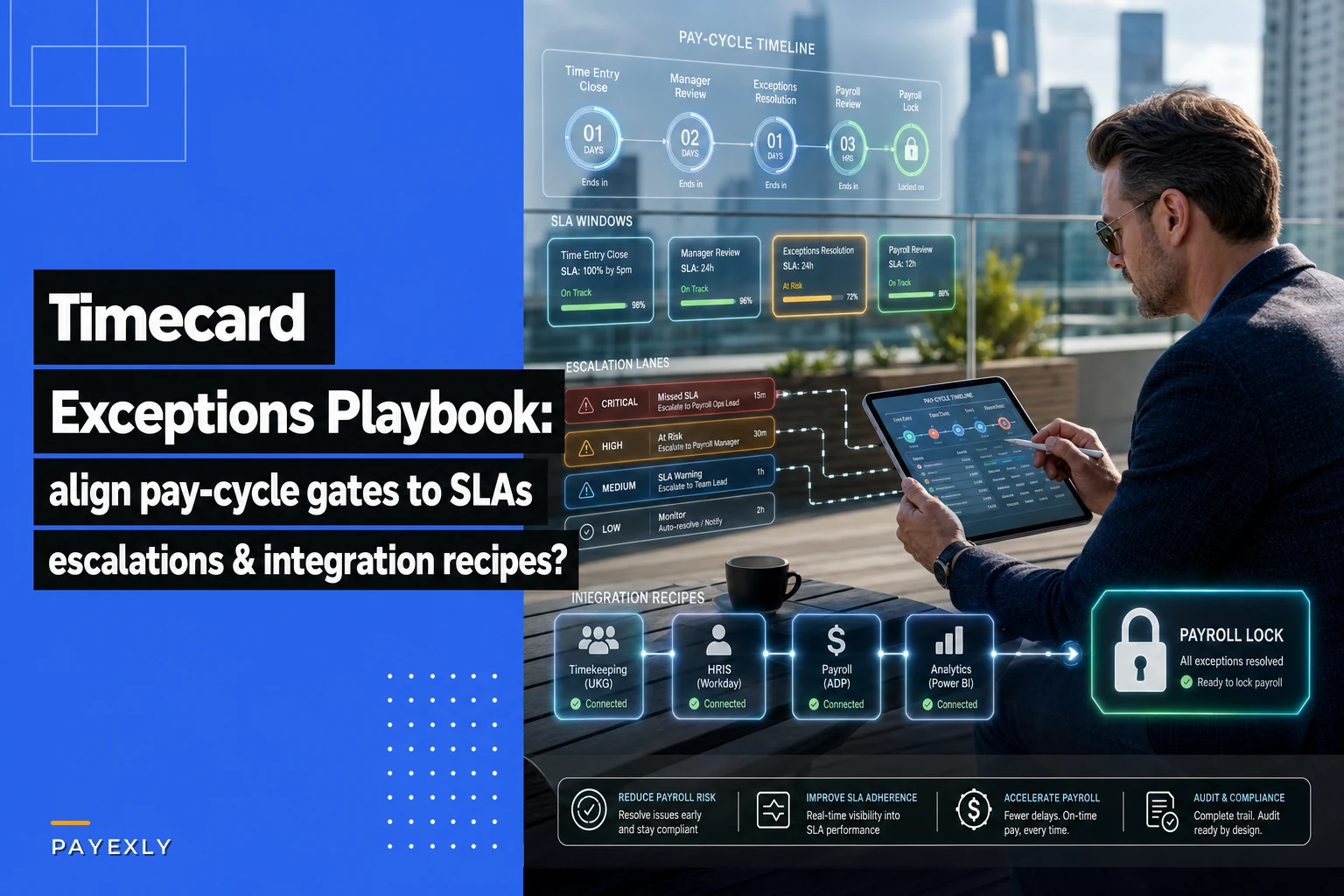
Think of it this way: your pay cycle has gates, and each gate should close cleanly before the next one opens. If a gate can't close because of open exceptions, that's your escalation trigger, not a surprise you discover at the final gate.
A typical backward map for a weekly cycle that locks Wednesday at noon:
| Gate | Deadline | Exception resolution SLA | Escalation if unresolved |
|---|---|---|---|
| Time entry closes | Mon 11:59 PM | Missing/incomplete punches flagged within 1 hr of close | Notify employee + direct manager Tue 8 AM |
| Manager approval | Tue 5 PM | Unapproved cards flagged Tue 1 PM | Escalate to dept head Tue 3 PM |
| Pre-lock validation | Wed 9 AM | High-severity exceptions (OT spike, terminated employee, hours over threshold) resolved by Wed 10 AM | Payroll lead + HR at Wed 10 AM |
| Payroll lock | Wed 12 PM | Nothing open at lock | Anything unresolved goes to documented decision, not silent fix |
The exact times aren't the point. The point is that every exception category now has a resolution deadline that sits earlier than the lock, plus a named person who inherits the problem when that deadline passes. That's the whole mechanism.
Notice the pre-lock validation gate — that's where the checks you run before locking catch what the clock software missed. The logic for those checks overlaps heavily with the kind of prioritized validation covered in our pre-filing payroll validation recipes, just applied earlier in the cycle to timecards specifically.
Not all exceptions deserve the same clock
One mistake teams make is treating every exception with the same urgency. A missing lunch punch and a terminated employee still accruing hours are not the same problem, and giving them identical SLAs either burns everyone out chasing trivia or lets the genuinely dangerous ones slide.
Sort exceptions into rough severity bands and give each band its own resolution window:
-
Critical (resolve same-day, escalate fast) terminated employee with active time, hours exceeding a hard threshold (e.g., over 80 in a week for a full-timer), duplicate shift entries, pay rate mismatches
-
High (resolve before manager-approval gate) unapproved timecards, missing manager sign-off on overtime, shifts crossing scheduled thresholds
-
Medium (resolve before pre-lock validation) missing punch-outs the system auto-filled, meal-break violations, minor rounding disputes
-
Low (resolve within cycle, no escalation needed) cost-center miscodes that don't affect gross pay, note or comment omissions
The severity band determines two things: how tight the SLA is, and how fast it escalates. A critical exception might have a two-hour resolution window and escalate to the payroll lead immediately. A low one just needs to be closed before lock and never bothers anyone above the employee's manager.
One pattern worth flagging: teams tend to over-escalate medium exceptions and under-escalate critical ones, because the medium ones are loud — employees complain — and the critical ones are quiet. A terminated employee's phantom hours don't file a complaint. Build your escalation timing around actual payroll risk, not around who's making noise.
Escalation windows that actually move things
An SLA with no teeth is just a suggestion. The escalation window is what makes it real — it's the answer to "the deadline passed, now what?"
Every resolution SLA needs a defined next-owner and defined timing. When a manager hasn't approved timecards by the Tuesday deadline, the exception doesn't just stay red on a dashboard. At a specific time, ownership moves up a level. That handoff needs to be automatic and visible, not dependent on someone remembering to chase it.
-
Tue 1 PM — approval still open, automated reminder to the manager
-
Tue 3 PM — still open, escalate to department head, manager CC'd
-
Wed 9 AM — still open, payroll lead takes ownership and either forces approval per policy or documents the decision to pay as-submitted
-
Wed 12 PM — lock; anything unresolved is a logged exception with a name attached, never a silent last-second edit
The important design choice is step 3. When approvals never come, someone has to make a call, and that call should follow a written policy — usually "pay as submitted and flag for review" or "hold to next cycle" — rather than an ad-hoc decision made under time pressure. Defining that default in advance is what removes the panic. This kind of ownership routing fits naturally inside a broader payroll governance framework, where the RACI for exactly these handoffs gets documented.
The reconciliation checks that catch what the clock lets through
Time clock software is optimistic. It will happily accept a punch-in at 6 AM and a punch-out at 6 AM the next day and call it a 24-hour shift. It will auto-fill a missing punch with a default and never tell you it guessed. These aren't errors the clock flags — they're errors it creates and then hides.
The pre-lock validation gate needs its own reconciliation checks that run against aggregated timecard data, not just individual entries. A few that consistently catch real problems:
-
Hours-vs-schedule variance flag anyone whose recorded hours deviate from their scheduled hours by more than a set percentage. Catches double-counted shifts and forgotten punch-outs.
-
Headcount reconciliation compare the list of employees with time this cycle against the active roster. Anyone with hours who's terminated or on unpaid leave gets flagged critical.
-
Overtime concentration flag employees with OT above a threshold, and flag any department where OT jumped versus a rolling average. Sudden spikes are usually punch errors, not real work.
-
Rate-times-hours sanity check flag gross-pay entries that fall outside an expected band for that role. Catches rate mismatches before they hit the file.
-
Zero-hour and duplicate check active employees with zero hours and any employee appearing twice in the batch.
These run automatically at the Wednesday 9 AM gate so the payroll lead sees a clean, prioritized list at 9:05 — not a pile of raw data to comb through. The gap between "raw exceptions exist" and "exceptions are surfaced, sorted, and assigned before the gate" is where most of the last-minute chaos actually gets eliminated.
Integration recipes that prevent the manual patch
Most last-minute manual fixes exist because data doesn't move cleanly between the clock system, the approval workflow, and payroll. Someone exports a CSV, edits it, re-imports it — and every one of those touchpoints is a chance to introduce the error you were trying to fix.
A few integration patterns that cut the manual steps:
Recipe 1 — Flag at close, not at lock. The instant time entry closes Monday night, run the completeness checks — missing punches, zero-hour actives — and push flagged items straight to the employee and manager. Don't wait for a human to notice Tuesday afternoon. Catching a missing punch-out Monday at midnight means it gets fixed Tuesday morning, calmly.
Recipe 2 — Sync approvals bidirectionally. When a manager approves in the timekeeping tool, that state should be reflected in the payroll system automatically. The classic failure is approvals living in one system while payroll reads a stale snapshot, so the payroll team "helps" by manually marking things approved — which breaks the audit trail.
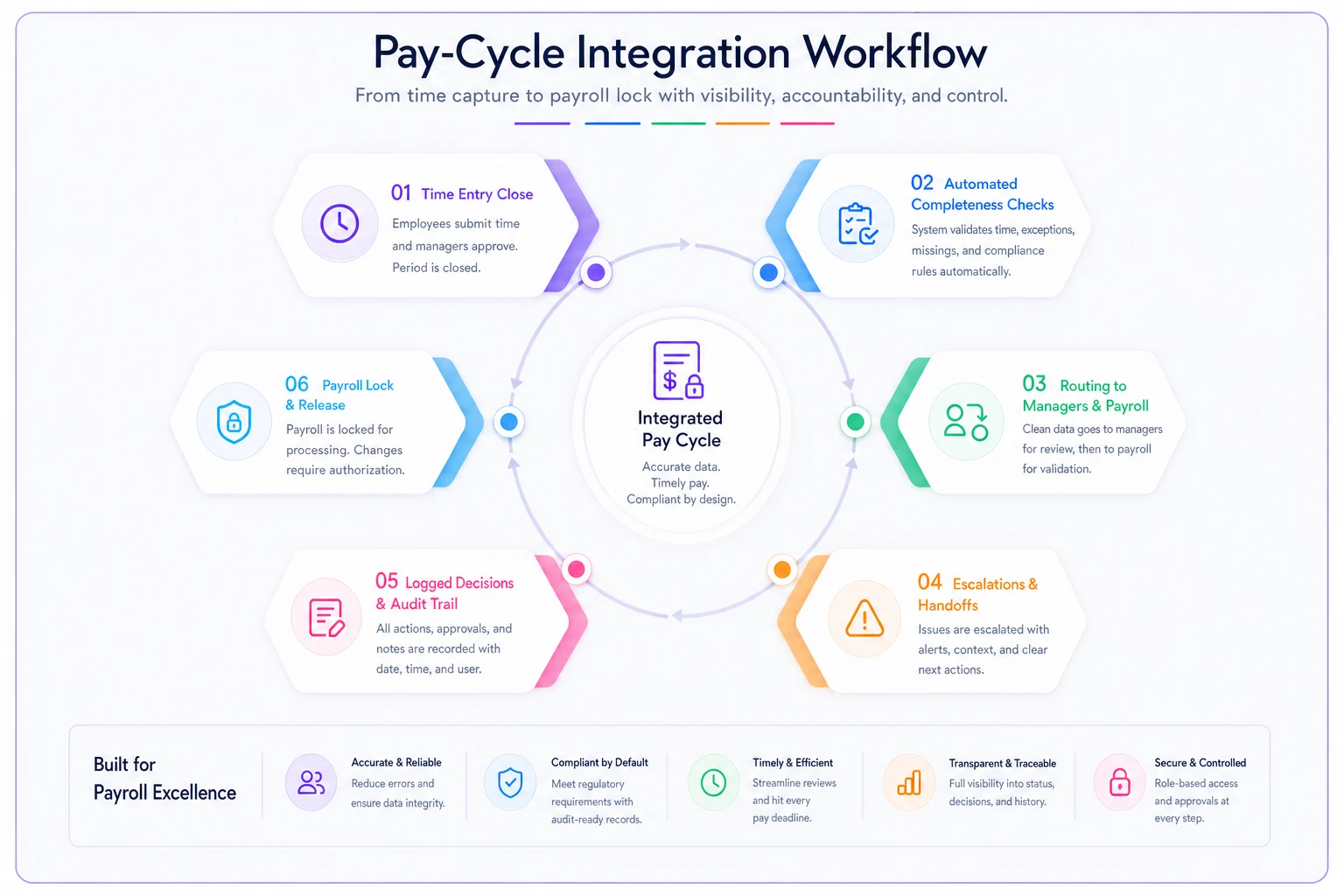
Recipe 3 — Route exceptions, don't dump them. Instead of one giant exception report, route each flagged item to its owner based on severity and department. The manager sees their team's unapproved cards; the payroll lead sees only critical items. This is where AI-assisted routing in modern operational platforms earns its keep — categorizing and assigning exceptions by type and severity so the right person gets the right subset without anyone manually triaging a 200-row report at 9 AM.
Recipe 4 — Write escalations to a log, not an inbox. Every escalation and every "pay as submitted" decision should write to a durable record with a timestamp and a name. Email chains disappear; a logged decision survives the next audit.
The theme across all four: the more of the cycle that moves between systems without a human copy-pasting, the fewer places a rushed fix can go wrong. Workflow platforms that connect timekeeping to approvals to payroll — and apply automated checks and routing at each gate — collapse the Monday-to-Wednesday danger zone from a scramble into a series of small, on-time handoffs.
A real scenario
A regional home-services company — roughly 140 field and office staff across four locations, weekly pay — ran into this constantly. Their clock system fed a CSV into payroll, and every Wednesday the payroll admin spent the morning fixing missing punches, chasing two or three managers for approvals, and catching the occasional phantom hours from a recently terminated tech.
The exception count wasn't wild — usually somewhere in the 20–30 range per week — but they all surfaced at once right at lock time, so it felt like an emergency every single week. Off-cycle corrections ran about two or three a month, mostly from rushed edits that introduced a new error while fixing the original one.
They didn't buy new software first. They mapped the gates: flag completeness Monday night, hard approval deadline Tuesday 5 PM with escalation to location managers Tuesday afternoon, reconciliation checks Wednesday 9 AM, lock at noon with a written "pay as submitted and review" default. Then they wired the clock-to-payroll sync so approvals stopped living in two places.
Within about two cycles, the Wednesday morning fix session dropped from a couple of frantic hours to maybe 20–30 minutes of reviewing a short flagged list. Off-cycle corrections fell to roughly one a month, and the ones that remained were legitimate late data, not self-inflicted edit errors. The exceptions didn't go away — they just stopped all arriving at the deadline at once.
When this level of structure makes sense — and when it doesn't
If you're running payroll for a handful of salaried people with rare exceptions, mapping four gates and severity bands is overkill. A simple checklist and a Tuesday reminder covers you.
This structure earns its weight when you have hourly staff, multiple managers approving time, physical time clocks (which generate the messiest exceptions), or multiple locations where you can't just walk over and ask someone why their card looks wrong. Once approvals are distributed across people who don't sit near payroll, the escalation timing stops being bureaucracy and starts being the only thing that gets timecards approved before lock.
The one situation to avoid: building elaborate SLAs and escalation chains but never enforcing them. An escalation window that everyone ignores is worse than none, because it creates the illusion of control while the same Wednesday scramble happens anyway. If you define the gates, the handoffs have to actually fire — automatically if possible — or the whole thing decays back into a spreadsheet at 11:40.
Where to start
You don't need to build all of this at once. The single change that removes the most panic: move exception detection from lock time to close time. Running your completeness checks the moment time entry closes — instead of the morning of lock — gives you a full day of buffer and turns most emergencies into routine follow-ups.
Run completeness checks immediately at time entry close to gain a full day of buffer.
From there, add the Tuesday approval deadline with a real escalation, then the pre-lock reconciliation checks, then the integration work to stop copy-pasting between systems. Each step shrinks the window where a manual fix can sneak in and cause the correction you'll be cleaning up next week. The goal isn't zero exceptions — it's exceptions that resolve on a clock you control, well before the one that actually matters runs out.
From there, add the Tuesday approval deadline with a real escalation, then the pre-lock reconciliation checks, then the integration work to stop copy-pasting between systems. Each step shrinks the window where a manual fix can sneak in and cause the correction you'll be cleaning up next week. The goal isn't zero exceptions — it's exceptions that resolve on a clock you control, well before the one that actually matters runs out.
Ready to simplify your payroll operations?
Join 2,000+ businesses using Payexly to reduce payroll overhead, ensure compliance, and enhance employee satisfaction.