


Most payroll validation happens backwards. Companies run their standard reports, submit their filings, then discover errors when state notices arrive six weeks later. By that point, you're dealing with penalties, amended returns, and explaining to leadership why the Q3 941 was off by $47,000.
The real problem isn't missing validation entirely. It's running the wrong checks in the wrong order at the wrong time. After watching dozens of companies scramble through year-end corrections, the pattern becomes obvious: everyone validates totals but misses the structural issues that create those incorrect totals in the first place.
Risk-based validation hierarchy
Payroll errors aren't equal. A missing middle initial won't trigger an IRS notice, but a misclassified employee absolutely will. Yet most validation processes treat every field with equal importance, wasting time on low-risk checks while high-risk issues slip through.
The validation hierarchy that actually prevents filing disasters looks different from standard checklists. Start with structural integrity checks that can invalidate entire filing periods. An employee marked as both exempt and non-exempt in different systems doesn't just affect one paycheck—it corrupts every overtime calculation, every tax withholding, and every quarterly filing until caught.
Tax classification mismatches come next. When your payroll system shows someone as single but your benefits platform has them married filing jointly, you're looking at withholding errors that compound every pay period. These aren't rounding errors. A senior engineer making $145,000 with the wrong filing status means roughly $3,400 in quarterly withholding variance.
Only after structural and classification checks should you validate computational accuracy. Gross-to-net calculations matter, but they're usually symptoms of upstream problems. Fix the data architecture first, then verify the math.
Quarterly validation cookbook
Q1: Post-W2 reconciliation period
Eliminate payroll errors and delays.
Payexly streamlines every payroll cycle ensuring accuracy and compliance.
- Automated payroll processing
- Real-time tax compliance
- Benefits & deductions management
No credit card required
January through March gives you the cleanest validation window. Year-end W2s just went out, so discrepancies are fresh. This is when you catch the ghosts—employees who left in October but somehow still show active tax withholdings.
Employee status validation (SQL)
SELECT e.employeeid, e.fullname, e.terminationdate, p.lastpayrolldate, p.totalq1withholding FROM employees e JOIN payrollsummary p ON e.employeeid = p.employeeid WHERE e.terminationdate < '2024-01-01' AND p.totalq1withholding > 0 ORDER BY p.totalq1_withholding DESC;
This query catches the classic "termed but still paying taxes" scenario. Run this before your first Q1 payroll, not after your 941 submission.
Excel alternative for smaller operations:
=IF(VLOOKUP(A2,EmployeeMaster!A:C,3,FALSE)<DATE(2024,1,1), IF(VLOOKUP(A2,Q1Payroll!A:B,2,FALSE)>0,"ERROR: Termed employee has Q1 activity","OK"), "Active employee")
Q2-Q3: Mid-year state registration catch
April through September is when multi-state compliance issues surface. Employees work remotely from different states, temporary assignments become permanent, and nobody updates the tax jurisdictions until a state audit notice arrives.
Multi-state withholding validation (SQL)
WITH employeestates AS ( SELECT employeeid, COUNT(DISTINCT workstate) as statecount, STRINGAGG(DISTINCT workstate, ', ') as statesworked FROM timesheetdata WHERE entrydate >= DATEADD(quarter, -1, GETDATE()) GROUP BY employeeid ) SELECT es.employeeid, e.fullname, es.statesworked, pw.stateswithheld, CASE WHEN es.statecount > LEN(pw.stateswithheld) - LEN(REPLACE(pw.stateswithheld, ',', '')) + 1 THEN 'Missing state withholding' ELSE 'OK' END as validationstatus FROM employeestates es JOIN employees e ON es.employeeid = e.employeeid JOIN payrollwithholding pw ON es.employeeid = pw.employeeid WHERE es.state_count > 1;
Q4: Year-end accumulator verification
October through December requires different validation logic. You're not just checking current quarter accuracy—you're validating full-year accumulators that affect W2s, benefit calculations, and next year's setup.
YTD accumulator reasonableness check (Excel)
=IF(AND( YTDGross > (HourlyRate 2080 0.75), YTDGross < (HourlyRate 2080 1.5), YTDFederalWH / YTDGross > 0.05, YTDFederalWH / YTDGross < 0.35), "Pass", "Review: " & IF(YTDGross < (HourlyRate 2080 0.75), "Low gross", IF(YTDGross > (HourlyRate 2080 1.5), "High gross", "Tax rate out of range")))
The classification time bomb
Employee classification errors create cascading validation failures. A contractor converted to W2 mid-year but still coded as 1099 in your benefits system triggers multiple downstream issues. Their 401k eligibility calculation runs wrong. Their PTO accrual never starts. Their workers comp classification stays incorrect.
Here's the validation that catches these before they cascade:
SELECT p.employeeid, p.fullname, p.payrollclassification, h.hrisclassification, b.benefitsclassification, t.timetrackingclassification, CASE WHEN p.payrollclassification != h.hrisclassification THEN 'HRIS mismatch' WHEN p.payrollclassification != b.benefitsclassification THEN 'Benefits mismatch' WHEN p.payrollclassification != t.timetrackingclassification THEN 'Time tracking mismatch' ELSE 'Consistent' END as mismatchtype FROM payrollemployees p LEFT JOIN hrisemployees h ON p.employeeid = h.employeeid LEFT JOIN benefitsenrollment b ON p.employeeid = b.employeeid LEFT JOIN timetrackingusers t ON p.employeeid = t.employeeid WHERE p.payrollclassification != h.hrisclassification OR p.payrollclassification != b.benefitsclassification OR p.payrollclassification != t.timetracking_classification;
Pre-submission automation rules
Manual validation catches obvious errors. Automated rules catch the subtle ones that create amended filings. The difference between a clean submission and a correction notice often comes down to these edge cases.
Rule 1: Retroactive pay adjustment detection Any payroll adjustment affecting a prior quarter triggers immediate validation. Not next week. Not at month-end. The moment someone processes a retroactive payment, your validation should fire.
def validateretroadjustment(employeeid, adjustmentdate, affectedperiod): if affectedperiod < currentquarterstart(): priorfiling = getfiled941(affectedperiod) adjustedwages = calculateadjustedwages(employeeid, affectedperiod) if abs(adjustedwages - priorfiling.reportedwages) > 100: escalatetocontroller( f"Retro adjustment will require 941-X for Q{getquarter(affectedperiod)}" ) return False return True
Rule 2: Benefits-to-payroll synchronization When benefits elections change, payroll deductions must update within the same pay period. Sounds obvious. Rarely happens cleanly.
Rule 3: State registration lag detection New employee works in Nevada. Payroll starts withholding Nevada tax. But your company isn't registered in Nevada yet. This validation fires before the first Nevada withholding processes, not after the state sends a notice.
Escalation paths that actually work
Validation without escalation is just report generation. The escalation path determines whether errors get fixed or just documented.
Tier 1: Auto-correction possible
-
Missing employee ID
System assigns temporary ID, flags for update
-
Blank department code
Defaults to employee's last known department
-
Zero hours but active status
Blocks payroll processing, requires manager confirmation
Tier 2: Controller review required
-
Tax status mismatches between systems
-
Retroactive adjustments crossing quarters
-
Multi-state withholding discrepancies
Tier 3: Stop-the-process triggers
-
Negative YTD balances
-
Employer tax liability variance over $5,000
-
Same SSN, different names
Each tier has different response times. Tier 1 fixes happen in-cycle. Tier 2 gets 24-hour review. Tier 3 stops everything until resolved.
| Tier | Examples | Response Time |
|---|---|---|
| Tier 1 | Missing employee ID: System assigns temporary ID, flags for update; Blank department code: Defaults to employee's last known department; Zero hours but active status: Blocks payroll processing, requires manager confirmation | In-cycle |
| Tier 2 | Tax status mismatches between systems; Retroactive adjustments crossing quarters; Multi-state withholding discrepancies | 24-hour review |
| Tier 3 | Negative YTD balances; Employer tax liability variance over $5,000; Same SSN, different names | Stop the process until resolved |
Each tier has different response times. Tier 1 fixes happen in-cycle. Tier 2 gets 24-hour review. Tier 3 stops everything until resolved.
Building validation into your operational flow
The gap between knowing these validations and actually running them consistently is where most companies fail. Validation can't be a quarterly fire drill.
Start with daily exception reports that catch issues while they're still correctable. An employee's tax status changing mid-pay-period is a 30-second fix on Tuesday, but a multi-hour problem if caught during Friday's payroll run.
Start with daily exception reports that catch issues while they're still correctable.
Weekly classification audits prevent error accumulation. When someone's employment status changes in your HRIS, it should trigger validation across payroll, benefits, and time tracking that same day—not eventually.
This is where AI-powered operational software shifts payroll validation from reactive to preventive.
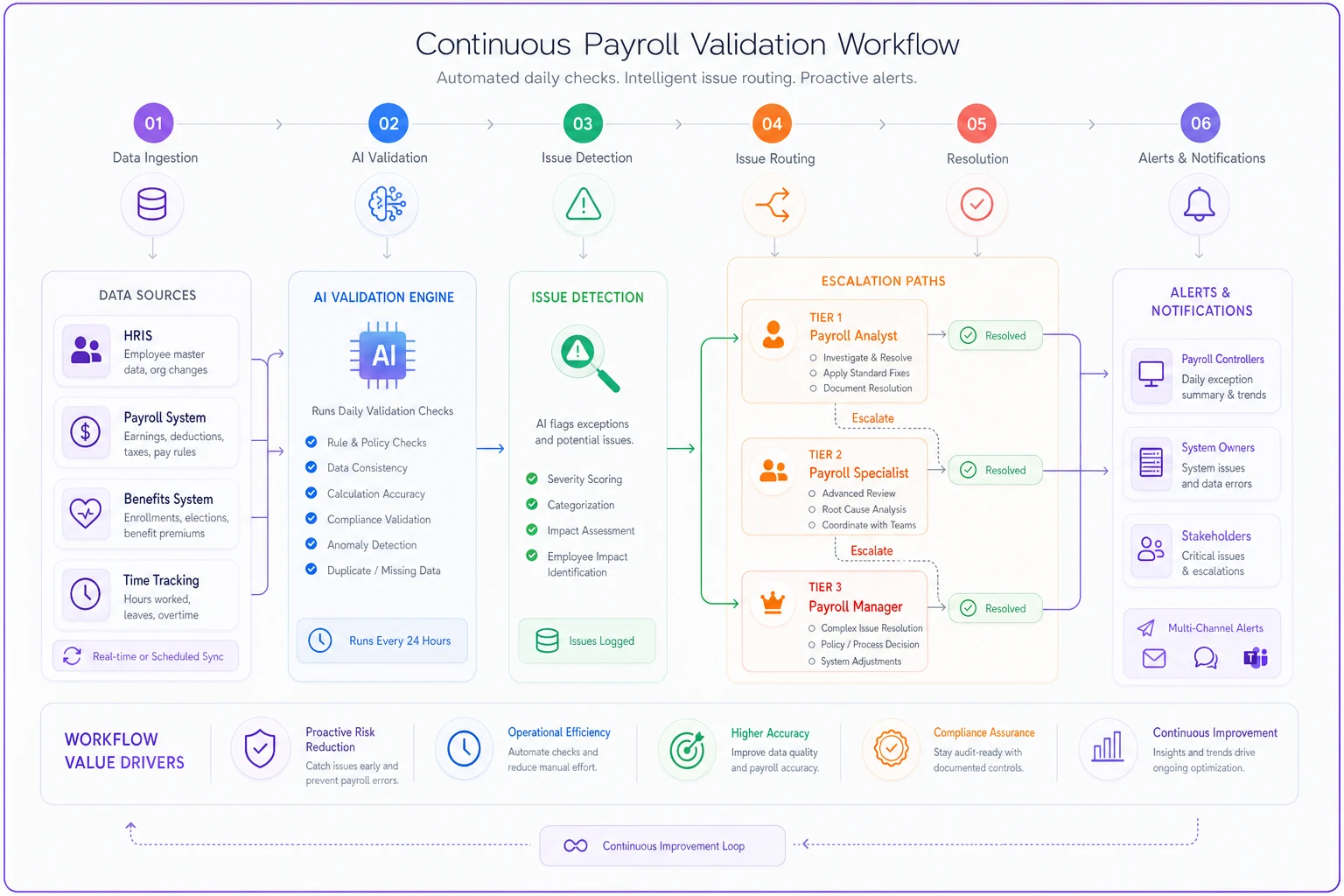
The better platforms don't try to replace your existing payroll system. They sit alongside it, continuously validating data flows between your HRIS, payroll, benefits, and time tracking tools. When three employees in the same department show similar classification inconsistencies, it flags the systemic issue before it spreads. When retroactive adjustments spike in certain months, it tightens validation timing automatically. It's essentially a controller-level review running in the background, with escalation paths routing issues to the right person before they become filing problems.
The quarterly validation reality check
Perfect payroll validation is a myth. The goal isn't catching every possible error—it's catching the expensive ones before they compound. A missing apartment number won't trigger penalties. Misclassified employees will.
Companies that avoid amended filings don't have more sophisticated validation. They have better prioritization. They know which validations to run daily versus quarterly. They understand which errors self-correct versus which ones cascade. Most importantly, they've built validation into their operational rhythm rather than treating it as a pre-filing scramble.
The recipes and queries above aren't comprehensive—no validation framework is. But they catch the errors that generate notices, trigger penalties, and require amended filings.
Run them consistently, escalate promptly, and fix systematically. Your year-end won't be perfect, but it'll be clean enough that you're not explaining variances to leadership in February.
Ready to simplify your payroll operations?
Join 2,000+ businesses using Payexly to reduce payroll overhead, ensure compliance, and enhance employee satisfaction.