


Most payroll disasters don't start in payroll. They start three days earlier, in the time clock system, where a rounding rule quietly rounded 15,000 punches the wrong way, or a field mapping silently dropped shift differentials for the night crew. By the time it surfaces, you're in the preview run, it's Thursday afternoon, and pay date is Friday.
This is the part of the pipeline nobody wants to own. HR thinks it's a payroll problem. Payroll thinks it's an IT problem. IT thinks the time vendor should handle it. Meanwhile the actual integration—the thing that moves hours from the clock into gross pay—runs on assumptions nobody wrote down.
So this post is narrowly about that handoff. Not timecard approvals (we've covered timecard exception management already), but the mechanical layer underneath: how fields map, how rounding is actually applied, and what you check before you run anything so last-minute exceptions stop ambushing you.
Where the integration actually breaks
If you line up a dozen "surprise" payroll exceptions and trace them back, they cluster in a few predictable spots. None of them are exotic.
Rounding mismatches between systems. The time system rounds to the nearest quarter hour on the punch. Payroll rounds on the daily total. Both are "correct." Together they create drift that nobody budgeted for.
Field mappings that assume stability. Someone mapped paycode07 to "Overtime" eighteen months ago. Then the time vendor pushed an update, renumbered pay codes, and now paycode07 is "Bereavement." The integration doesn't error—it just pays people bereavement hours at straight time and the overtime disappears.
Partial exports treated as complete. The nightly file came in. It had 1,180 records. Last cycle it had 1,340. Nobody noticed the export cut off mid-transfer because the file existed and the import succeeded. Technically everything was green.
Edits that land after the pull. A manager fixes a missed punch at 4:50pm. The integration pulled at 4:30pm. That correction now lives in the time system but not in the pay run, and it won't surface until the employee complains.
The common thread here: these aren't failures that throw red alerts. They're silent discrepancies. Everything looks fine until someone reconciles after the fact—usually an employee, usually angry.
Field-level mapping templates (do this once, properly)
The single most useful artifact you can build is a field-level mapping document specific enough to be boring. Not "hours map to hours." Every field, every source, every transformation.
Eliminate payroll errors and delays.
Payexly streamlines every payroll cycle ensuring accuracy and compliance.
- Automated payroll processing
- Real-time tax compliance
- Benefits & deductions management
No credit card required
A workable template has these columns:
| Source Field (Time System) | Data Type | Target Field (Payroll) | Transformation | Owner | Last Verified |
|---|---|---|---|---|---|
emp_id | string | Employee Number | strip leading zeros | HR Ops | 2024-Q1 |
reg_hours | decimal(5,2) | Regular Hours | none | Payroll | 2024-Q1 |
ot_hours | decimal(5,2) | Overtime Hours | none | Payroll | 2024-Q1 |
pay_code | int | Earning Code | lookup table v3 | Payroll + Vendor | 2024-Q1 |
shiftdiffflag | bool | Diff Earning Code | if true → code 212 | HR Ops | 2024-Q1 |
dept | string | Cost Center | GL crosswalk | Finance | 2024-Q1 |
Two things people skip that cause most of the pain:
The "Last Verified" column. Mappings rot. A date forces someone to re-confirm that pay_code 07 still means what you think it means. If the newest verification date is older than your last time-vendor update, that's your audit list right there.
The lookup table version number. If your earning-code crosswalk is referenced by version, you can diff versions and instantly see what changed. Without versioning, you're comparing two spreadsheets by eye at 5pm on a Thursday. This is the same discipline that makes payroll data contracts and APIs reliable—treat the mapping as a contract, not a convenience.
A quick note on employee identifiers, because this one is sneaky. If the time system stores IDs as strings and payroll stores them as integers, 00482 and 482 are the same person in your head and two different records in the join. Decide the canonical format, write the transformation down, and don't let it stay implicit.
The rounding policy matrix
Rounding is where "both systems are right and the paycheck is still wrong" happens most often. The fix isn't a smarter rounding rule—it's deciding, explicitly, where rounding happens and making sure it only happens once.
Here's the matrix worth building. For each category, you answer: round at punch, round at daily total, or round at pay-period total—and pick exactly one.
| Scenario | Round at Punch | Round at Daily | Round at Period | Chosen |
|---|---|---|---|---|
| Regular hourly | ✓ optional | ✓ common | ✗ | Daily |
| Overtime calc | must match reg | ✓ | ✗ | Daily |
| Shift differential | tied to punch | — | — | Punch |
| Meal break deduction | fixed deduction | — | — | Fixed |
| Salaried exempt | n/a | n/a | n/a | No rounding |
The mistake that creates drift is rounding at two layers. The time system rounds each punch to the nearest 6 minutes, then payroll rounds the daily total again. Each employee loses or gains a couple minutes per day. Multiply that across a few hundred people over a quarter and you've got a real number—plus a compliance exposure, because the rounding is no longer neutral. It's systematically favoring one side.
The neutrality test. Over a full pay period, does your rounding net roughly to zero across the workforce? If it consistently shaves time off employees, that's not a rounding policy—that's a wage problem waiting for an auditor. Run the comparison: sum of raw minutes vs. sum of rounded minutes. A lopsided gap means your matrix has a bug.
One more thing worth flagging: the 7-minute rule (round to nearest quarter hour, 7 minutes and under rounds down) only stays legal if applied symmetrically. If your time system applies it and payroll also nudges totals, you've broken the symmetry without realizing it.
Pre-run completeness checks
This is the cheapest insurance in the entire process and the most commonly skipped. Before anyone touches the preview run, you do a short completeness pass on the imported data. Not a payroll calc—just "did we get everything, and does it look sane."
Pre-run checklist that catches the silent failures:
-
Record count vs. expected headcount. Active employees scheduled this period = X. Records imported = Y. If Y < X, who's missing and why?
-
Record count vs. prior period. A swing of more than roughly 5% without a known reason (new hires, terminations, seasonal) is a flag, not a fact.
-
Zero-hour active employees. Anyone active with 0 hours and no leave code. Usually a missed punch batch or a mapping that dropped their department.
-
Hours outliers. Anyone over ~80 hours in a biweekly period, or a daily total over 16 hours. Almost always a duplicate punch or a missed clock-out.
-
Unmapped pay codes. Any earning code in the file that isn't in your current lookup table version. Early warning for vendor changes.
-
Pending edits timestamp. Last approved edit in the time system vs. the integration pull time. If edits exist after the pull, you pulled too early.
-
Differential and OT presence. Does the night shift actually show differential hours? Does anyone who worked over 40 show OT? Zeros where you'd expect values usually means a mapping dropped something.
Check the pending edits timestamp first—if approvals exist after your pull time, re-pull before running.
The highest-value check on this list is the pending-edits timestamp, because it directly prevents the 4:50pm correction problem. If you can see that approved edits exist after your pull time, you re-pull before running. One comparison, thirty seconds, saves an off-cycle payment later.
A simple pre-run workflow that actually gets followed
The reason pre-run checks get skipped isn't laziness—it's that they're not sequenced into the process with an owner and a gate. Here's a workflow that holds up:
-
Import closes at a fixed cutoff. Say 6
00am on run day. Managers know edits after that go to the next cycle unless escalated. The cutoff being real is what makes everything else work.
-
Automated completeness snapshot runs at cutoff +15 min. Record counts, outliers, unmapped codes, zero-hour actives, edit timestamps—generated as a one-page summary, not buried in logs.
-
Payroll reviews the snapshot before opening the run. This is a gate. No snapshot review, no preview run. Ten minutes, not ten hours.
-
Flagged items route to the right owner. Unmapped code → vendor/payroll. Missing department → HR Ops. Late edit → the submitting manager. Everyone knows who catches what.
-
Manager sign-off confirms their population is complete. Each department manager confirms "my people are all here and the hours look right" before the run, not after a complaint.
-
Snapshot is archived. It becomes the evidence that the data was validated pre-run. When something still slips through, you can see exactly what the data looked like at cutoff.
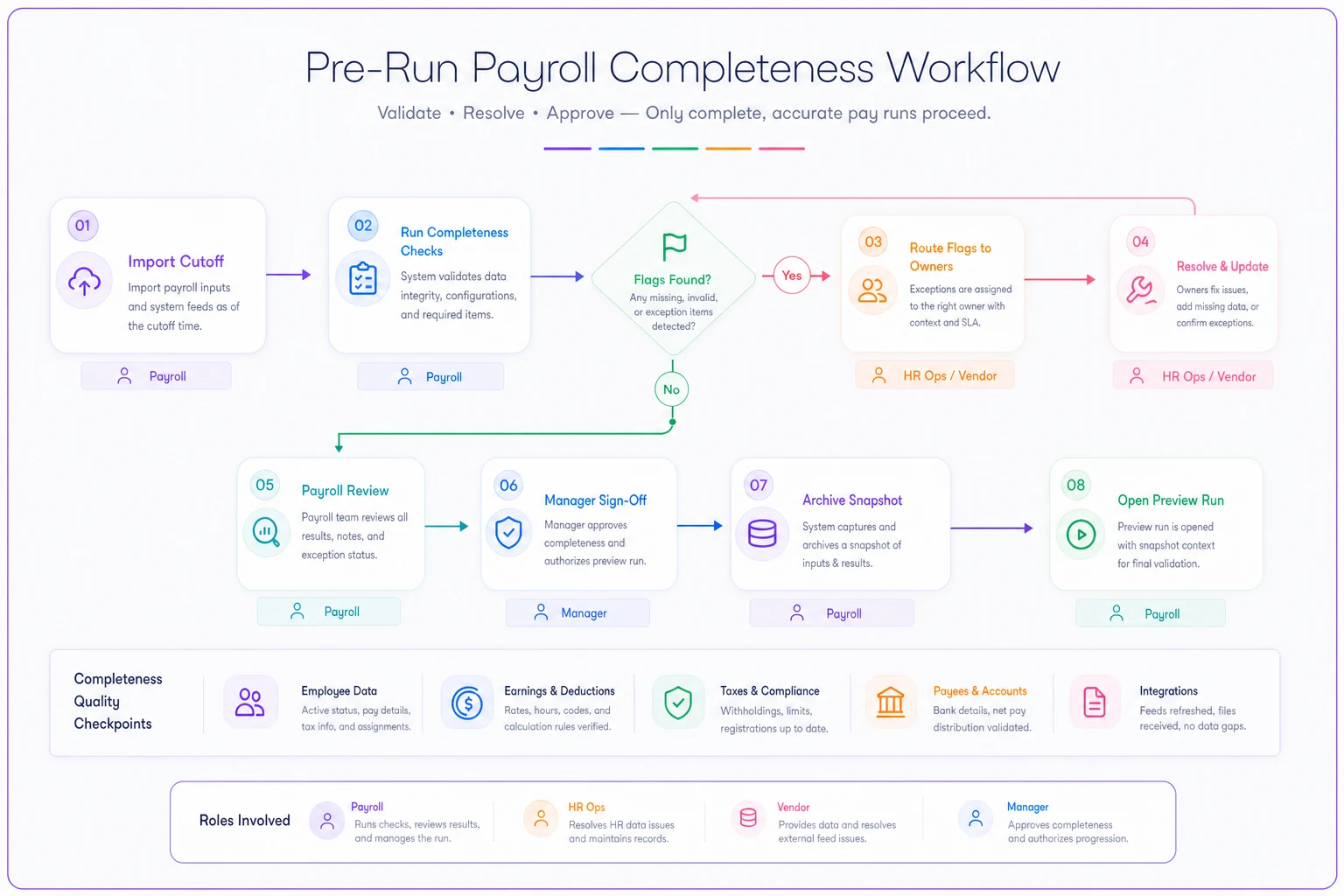
This sequence isn't complicated. The value is in having it written down with a named owner at each step, so it actually runs the same way every cycle.
Where lightweight automation earns its keep
You don't need to automate payroll to fix this. You need to automate the detection. The completeness snapshot, the version diff on pay codes, the edit-timestamp comparison, the rounding neutrality check—these are deterministic, repeatable tasks that are perfect candidates for a scheduled job that just produces a report.
Operational platforms that sit between the time system and payroll are useful here precisely because they handle the unglamorous part: pulling both files, running the field-level comparison against the mapping template, flagging unmapped codes, and surfacing a readable summary before anyone commits a run. AI-assisted checks can go a step further—catching that a department's hours pattern is off from its own history even when it's within global thresholds, or noticing that a renamed vendor pay code looks suspiciously like your old overtime code. The point isn't to replace the reviewer. It's to make sure the reviewer is looking at the three things actually wrong instead of scrolling 1,300 rows hoping something jumps out.
Keep the human sign-off. Automate the find.
A real scenario
A regional home-care company ran biweekly payroll for about 260 caregivers across three counties—heavy on overtime and shift differentials for overnight shifts. Their integration pulled timecards nightly and nobody reviewed it before the preview run.
The recurring problem: roughly once a quarter, a batch of overnight differential hours wouldn't make it into the run because a specific department code wasn't in the payroll crosswalk after a scheduler reorg. It never errored. It just paid somewhere between 20 and 30 caregivers straight time instead of differential. They'd catch it only when someone called in. Each correction meant an off-cycle run, manual journal entries, and a chunk of a payroll clerk's week—about a day and a half of cleanup each time, plus the trust hit with caregivers who felt shorted.
They added two things: a versioned pay-code lookup with a pre-run diff, and a completeness snapshot checking differential presence for overnight departments against the prior cycle. The first run after the change, the snapshot flagged a new department code the day it appeared—before the run, not after. Over the next few cycles they caught two more issues that would've become off-cycle corrections. The cleanup time dropped to near zero and the differential complaints stopped. Nothing fancy. They just moved the catch from after payroll to before it.
When this level of rigor is overkill
If you run payroll for 12 people on a single pay code with no differentials and salaried staff, you don't need a rounding matrix and a six-step workflow. A glance at the file is genuinely enough. Formalizing all of this would be process for its own sake.
It starts paying off when you hit multiple pay codes, overtime, shift differentials, more than one department or location, or any situation where edits trickle in close to cutoff. That's where silent discrepancies become statistically certain rather than occasional.
One group that should not lean on automated checks as a crutch: teams whose underlying mapping is undocumented. If you don't know what the fields are supposed to be, automating the comparison just gives you fast, confident, wrong answers. Fix the mapping document first. Then automate the watching.
Last-minute payroll exceptions mostly aren't surprises—they're discrepancies that existed hours earlier and nobody looked. The time-and-attendance handoff is where they're born: in rounding applied twice, in mappings that quietly drifted, in files that imported "successfully" with missing rows.
Build the mapping template with version numbers and a verification date. Decide once, explicitly, where rounding happens. Run a short completeness pass before the preview run, gated and owned. Get a quick manager sign-off on their own people. Do that, and the exceptions stop arriving on Thursday afternoon—because you caught them Tuesday morning when they were still cheap to fix.
Ready to simplify your payroll operations?
Join 2,000+ businesses using Payexly to reduce payroll overhead, ensure compliance, and enhance employee satisfaction.