

Three weeks ago, a manufacturing client called at 8:47 PM on a Thursday. Their payroll processor had corrupted half their direct deposit file, and Friday was payday for 180 employees. The HR manager was frantically calculating manual checks while the CFO wanted to wait for the processor to "fix it properly."
Neither approach would have worked. The real problem wasn't the corrupted file—it was that they had no payroll business continuity plan that actually mapped to their pay cycle reality.
Most payroll incident response plans fail because they treat every payroll problem the same way. A missing garnishment gets the same urgency as 500 employees not getting paid. Companies write these plans in a vacuum, focusing on IT recovery metrics instead of employee impact and regulatory deadlines.
The severity mapping problem nobody talks about
Traditional incident response uses simple severity levels: critical, high, medium, low. Payroll incidents don't fit neatly into those boxes. A single missing direct deposit might be "low" severity by IT standards but becomes critical if it's for an employee facing eviction.
I've watched companies spend four hours debating severity while employees' rent checks bounce. Finance says it's medium priority because it's "just one person." HR argues it's critical because of employee impact. IT won't prioritize without executive approval. Meanwhile, that employee is calling their landlord trying to explain why rent will be late.
The disconnect happens because payroll incidents have multiple dimensions that standard severity frameworks ignore.
Financial impact varies wildly based on timing. A $50,000 error on day one of the pay period might be fixable through normal processes. That same error discovered two hours before ACH cutoff requires completely different procedures.
Employee count doesn't tell the whole story either. Ten affected employees might seem minor, but if they're all in states with daily penalty provisions, you're looking at mounting fines every 24 hours.
Regulatory exposure compounds based on geography and employee classification. California's waiting time penalties can triple the cost of a delayed paycheck. New York's frequency requirements mean a missed weekly payroll for tipped employees triggers different violations than a missed monthly executive payroll.
Why rollback vs compensating payments isn't a technical decision
Most payroll teams think rollback is always the cleanest option. In reality, rollback procedures work maybe 30% of the time in production payroll environments.
Eliminate payroll errors and delays.
Payexly streamlines every payroll cycle ensuring accuracy and compliance.
- Automated payroll processing
- Real-time tax compliance
- Benefits & deductions management
No credit card required
The rollback assumption is that you can simply reverse transactions and start over. But once payroll data touches multiple systems—timekeeping, benefits, 401k, garnishments—a true rollback becomes nearly impossible. You end up with partial rollbacks that create more problems than the original error.
A retail chain we worked with discovered this firsthand. They found calculation errors affecting overtime for 300 employees across eight states. The payroll manager immediately initiated rollback. Forty-eight hours later, they had:
-
Successfully reversed direct deposits (but not paper checks)
-
Created negative balances in their garnishment system
-
Triggered 401k contribution reconciliation errors
-
Generated corrected tax filings that contradicted already-submitted state reports
The "clean" rollback turned into a three-week reconciliation nightmare touching seven different systems and requiring manual adjustments to over 2,000 individual records.
Compensating payments often work better in practice, even though they feel messier. Instead of trying to undo what happened, you process corrections that net out the errors. The accounting is more complex, but the operational execution is usually cleaner.
-
Calculate underpayments for affected employees
-
Process off-cycle payments for the differences
-
Document variances for tax reconciliation
-
Adjust next regular payroll for any overpayments
-
Update year-to-date totals in one coordinated effort
Compensating payments work forward through your systems while rollbacks try to work backward. In practice, most systems handle forward movement better than reversal.
The notification cascade that determines success or failure
Every payroll business continuity plan includes employee notification procedures. Almost none of them account for the cascading communication requirements of an actual incident.
A healthcare company had beautiful notification templates—professionally written, legally reviewed, translated into three languages. When their payroll system went down for 36 hours, those templates became almost useless because they hadn't mapped the actual notification flow.
The incident started Tuesday afternoon. By Wednesday morning, they needed to notify:
-
450 employees about potential payment delays
-
12 state tax authorities about possible late filings
-
3 union representatives per their collective bargaining agreements
-
8 garnishment agencies about potential missed payments
-
Their 401k administrator about contribution timing
-
Their health insurance carrier about premium payment delays
-
22 employees on visa status who needed pay documentation
Use day-one notifications to set expectations and share what you're investigating rather than promising exact outcomes.
Each stakeholder group needed different information at different times through different channels. Employees wanted to know if they'd get paid Friday. Tax authorities needed estimated correction dates. The 401k administrator needed exact contribution amounts that wouldn't be calculated until payroll actually processed.
Real notification frameworks have to account for information availability, not just stakeholder identification. Day-one notifications will have limited information. Day-two updates need to show progress without making promises you can't keep. Day-three communications often need to pivot based on which recovery path you're actually taking.
Building a tabletop testing schedule that actually prepares your team
Most companies test their payroll business continuity plan once a year, if at all. They gather in a conference room, walk through a scenario, update some contact information, and check the compliance box. Six months later, when something actually goes wrong, nobody remembers what they discussed.
Effective payroll incident response requires muscle memory, not theoretical knowledge. The companies that handle payroll crises well are the ones testing specific components monthly, not everything annually.
Here's the testing cadence that actually works:
-
First Monday
Severity classification exercise using recent near-misses
-
Second Tuesday
Notification cascade for one stakeholder group
-
Third Wednesday
Rollback vs compensating payment decision tree
-
Fourth Thursday
Vendor escalation and communication protocols
Quarterly integration tests (2 hours):
-
Full scenario from detection through resolution
-
Include actual system access and template usage
-
Rotate scenarios between different incident types
-
Document gaps and update procedures immediately
Annual surprise test (half day):
-
Unannounced scenario during actual payroll processing week
-
Test real decision-making under time pressure
-
Include coordination with actual vendors (pre-warned)
-
Measure actual response times, not theoretical ones
This diagram shows how monthly, quarterly, and annual tests integrate into a recurring tabletop testing workflow and who participates at each stage.
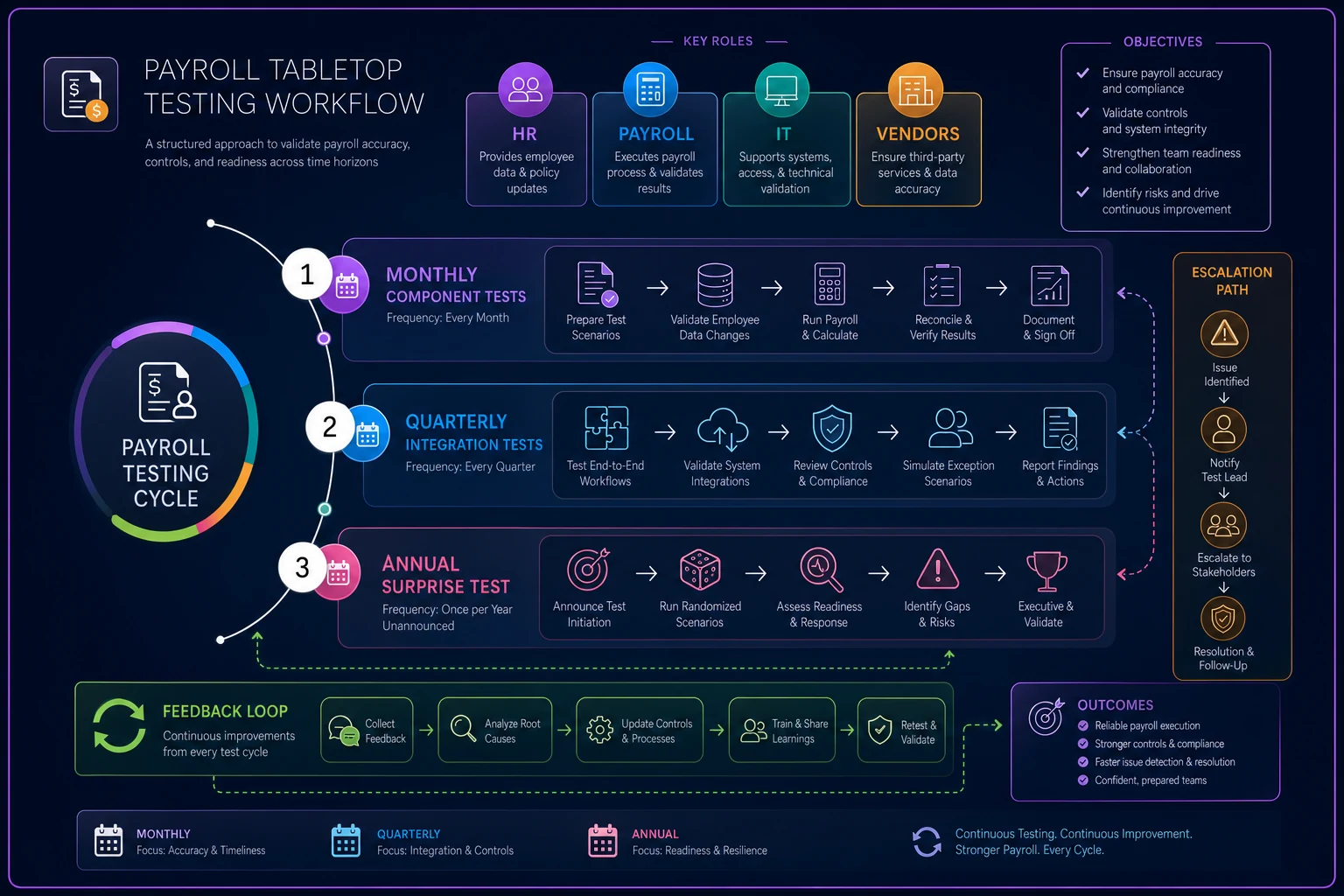
The monthly components build familiarity without disrupting operations. People learn procedures in small chunks. When the quarterly test comes, they're combining known elements rather than learning everything at once.
The hidden complexity of pay cycle alignment
Pay cycle alignment might be the most overlooked aspect of payroll incident response. Companies with multiple pay cycles—weekly hourly, biweekly salary, monthly executive, quarterly bonus—face exponentially more complex recovery scenarios than their plans account for.
-
Weekly for contractors (Fridays)
-
Biweekly for regular employees (alternating Fridays)
-
Monthly for executives (last business day)
-
Quarterly for sales commissions (15th of quarter-end month)
When their time-tracking integration failed, it hit all four cycles differently. The weekly contractors needed immediate fixes. The biweekly employees had a few days of buffer. The monthly executives wouldn't see impact for two weeks. The quarterly commissions were three weeks from processing.
| Incident Type | Weekly Impact | Biweekly Impact | Monthly Impact | Response Priority |
|---|---|---|---|---|
| Time import failure | 24 hours to fix | 3-5 days buffer | 10-15 days buffer | Weekly first |
| Tax calc error | Must fix before processing | Can patch after payment | Can correct next cycle | Varies by cycle |
| Direct deposit failure | Same-day response | Same-day response | Same-day response | Universal urgent |
| Benefits deduction error | Manual calc possible | Time for correction | Full reconciliation feasible | Monthly can wait |
Most companies never create this mapping. They discover these relationships during an actual crisis, when stress is high and time is short.
Why traditional DR metrics don't work for payroll
IT disaster recovery focuses on RTO (Recovery Time Objective) and RPO (Recovery Point Objective). These metrics make sense for system restoration but miss the mark for payroll operations entirely.
Your payroll system might be fully restored in four hours—meeting your RTO—but if those four hours span your ACH submission window, hundreds of employees won't get paid on time. The system is "recovered." The business impact is still massive.
Real payroll continuity metrics need to measure operational outcomes:
-
Time to Payment
How long until employees actually receive funds
-
Accuracy Recovery Rate
Percentage of correct payments vs manual workarounds
-
Downstream Impact Hours
Total time to resolve all system reconciliations
-
Compliance Gap Duration
Time outside regulatory requirements
A distribution company learned this after celebrating a "successful" disaster recovery test. They restored systems in six hours, well within their eight-hour RTO. But when they mapped the operational impact:
-
Missed direct deposit cutoff meant a two-day payment delay
-
Manual calculations introduced roughly a 15% error rate
-
Benefit reconciliations took two weeks
-
Three states assessed late payment penalties
Technically, the system recovery succeeded. The payroll continuity response was a failure.
The automation opportunity everyone misses
When companies think about automating payroll incident response, they usually focus on detection—monitoring for errors, flagging anomalies, setting up alerts. Detection is maybe 10% of the actual response effort.
The real opportunity sits in the coordination layer. During a payroll incident, someone needs to:
-
Track which employees are affected
-
Calculate impact amounts
-
Generate notification lists
-
Coordinate correction methods
-
Document every decision
-
Update multiple stakeholders
-
Reconcile across systems
These coordination tasks eat up around 70% of response time and introduce most of the errors. We built an automated incident response platform for a client that handles this coordination layer. When an incident triggers, it automatically:
-
Pulls affected employee data from multiple systems
-
Calculates financial impact by employee and in aggregate
-
Generates stakeholder-specific notification lists
-
Creates correction options with projected outcomes
-
Documents all actions in an audit trail
-
Updates status dashboards for all teams
-
Tracks regulatory deadlines by jurisdiction
The humans still make decisions—rollback vs compensating payments, notification timing, vendor escalation. But they make those decisions with complete information, updated in real time, without manual data gathering eating up the clock.
During their first real incident using this system, response time dropped from 14 hours to about 3. More importantly, they avoided the cascade of secondary errors that usually come from rushed manual coordination.
Building your own pay-cycle-aligned incident response playbook
Start with reality, not theory. Your payroll business continuity plan should reflect your actual operations, not generic best practices from a template someone downloaded.
Map your current state:
-
Document all pay cycles and processing schedules
-
List every system that touches payroll data
-
Identify all stakeholders and their notification requirements
-
Note regulatory deadlines by jurisdiction
-
Catalog previous incidents and response times
Then build your response framework:
Severity matrix that accounts for timing, not just impact. A $10,000 error might be low severity on day one of the pay period but critical on processing day.
Decision trees for rollback vs compensating payments based on:
-
Which systems have already been updated
-
Time until payment deadline
-
Number of employees affected
-
Regulatory implications of each approach
Notification workflows that specify:
-
Who gets notified when
-
What information they need at each stage
-
What channels to use
-
What promises you can and cannot make
Testing schedule that builds muscle memory:
-
Monthly component drills
-
Quarterly integrated scenarios
-
Annual surprise exercises
Don't try to perfect the plan before testing it. Build a basic governance framework, then iterate based on what you actually learn during exercises.
The real measure of readiness
A good payroll business continuity plan doesn't prevent incidents—it prevents incidents from becoming disasters. The difference shows up in the details: employees still get paid on time even when systems fail, errors get caught before they compound, regulatory deadlines get met even during recovery.
The manufacturing client from the beginning? After implementing a pay-cycle-aligned incident response playbook, they faced another processor failure five months later. This time, the response looked completely different.
Within 30 minutes, they had classified the incident severity based on pay cycle impact. The automated coordination platform identified 127 affected employees and calculated total financial impact. The decision to use compensating payments instead of rollback was made in hour one, not day three. Notifications went out with accurate timelines. Manual payment processing started immediately for critical cases.
By noon Friday, every employee had their money. Reconciliation was completed the following Wednesday. Zero regulatory penalties. Zero complaints to the state labor board.
The second incident was actually more complex than the first—more employees affected, multiple states involved, additional compliance requirements. But with the right playbook and supporting systems, complexity became manageable instead of paralyzing.
The HR team wasn't making panicked decisions at 9 PM. They were executing a tested plan with clear procedures and automated support handling the coordination work.
Retroactive corrections will still happen. Systems will still fail. But with a proper payroll business continuity plan that maps to your actual pay cycles, uses realistic severity classifications, and automates the coordination chaos, those incidents become operational challenges instead of organizational crises.
The difference between disaster and inconvenience isn't the incident itself—it's the quality of your response. And that quality comes from preparation that matches operational reality, not theoretical perfection.
Ready to simplify your payroll operations?
Join 2,000+ businesses using Payexly to reduce payroll overhead, ensure compliance, and enhance employee satisfaction.