

Mid-period benefits payroll changes are operationally messy in a way that's hard to explain until you've lived through it. Everything needs to keep moving, but one wrong calculation can cascade into weeks of cleanup, employees questioning their paystubs, and vendors threatening coverage lapses.
The complexity isn't just mathematical—it's organizational. HR systems speak one language, payroll systems speak another, and benefits vendors somehow speak a third. Meanwhile, employees are submitting life events on random Tuesdays, elections are hitting your desk with yesterday's effective date, and accounting is asking why pre-tax deductions don't match what the vendor billed.
Companies either have solid SOPs for mid-period changes or they're constantly playing catch-up. There's really no middle ground here.
The election validation problem
Most HR teams focus their validation effort on open enrollment. Makes sense—that's where the volume. But mid-period qualifying events create a different kind of validation problem that standard processes don't really address.
Here's a typical failure: an employee adds a spouse to medical coverage effective March 7th. HR enters it March 15th. Payroll processes it March 22nd for the March 31st check. The benefits vendor shows coverage starting April 1st because they require 30 days notice. Now you have an employee paying for coverage they don't have yet, a vendor billing for a full month when coverage starts mid-month, payroll deductions that don't match either timeline, and pre-tax calculations built on the wrong effective date.
The validation SOP that actually works starts with defining your truth source. Not multiple sources—one single system that owns the effective date. Usually that's your benefits administration platform, not your HRIS, and definitely not email confirmations.
Your validation checklist needs three checkpoints.
Entry validation (when HR inputs the change):
-
Does the qualifying event documentation support this effective date?
-
Is the effective date within vendor-allowed windows?
-
Will this create a retroactive period longer than one pay period?
Processing validation (when payroll calculates):
-
Does the system effective date match the benefits platform?
-
Are catch-up deductions calculated correctly?
-
Do pre-tax limits still hold with the pro-rated amounts?
Post-processing validation (after payroll runs):
-
Do deduction totals match what you'll remit to vendors?
-
Are year-to-date pre-tax amounts still tracking correctly?
-
Did any employees hit contribution limits due to catch-up amounts?
The businesses that handle this well run validation reports every Monday morning, comparing three data sources: benefits platform elections, payroll deduction setup, and vendor enrollment files. Mismatches get flagged before they hit paychecks—not after.
Effective date mapping across systems
The core issue isn't the math. It's that every system interprets "effective date" differently. Your benefits platform thinks it means when coverage starts. Payroll thinks it means when deductions begin. The vendor thinks it means when they start billing. Employees think it means when they clicked submit.
Eliminate payroll errors and delays.
Payexly streamlines every payroll cycle ensuring accuracy and compliance.
- Automated payroll processing
- Real-time tax compliance
- Benefits & deductions management
No credit card required
Build an effective date matrix that explicitly maps these relationships:
| Event Type | Employee Notice | Benefits Platform Entry | Payroll Deduction Start | Vendor Coverage Start | Vendor Billing Start |
|---|---|---|---|---|---|
| Marriage | Within 30 days | Same day as entry | Next payroll after entry | 1st of month after entry | Same as coverage |
| Birth | Within 30 days | Birth date | Next payroll after entry | Birth date | 1st of month after birth |
| Loss of coverage | Within 60 days | Loss date | Next payroll after entry | Day after loss | 1st of month after loss |
| Divorce | Within 60 days | Divorce date | Next payroll after entry | 1st of month after divorce | Same as coverage |
Retroactive effective dates are where things get genuinely messy. Employee has a baby February 15th, notifies HR March 20th. Coverage needs to go back to February 15th, but you can't retroactively deduct from paychecks already issued. So now you need catch-up deductions.
The mapping gets more complex with pre-tax benefits because you can't just double up deductions to catch up—you need to spread them within the plan year while respecting per-paycheck limits. A $500 monthly medical premium retroactive two months doesn't become a $1,500 deduction on the next check. It becomes whatever pro-rated amount keeps you compliant with Section 125 rules.
Pro-ration formulas that handle edge cases
Standard pro-ration formula everyone uses:
(Annual deduction ÷ pay periods) × (days covered ÷ days in period)
Except this breaks constantly. Employee adds coverage on the 17th of a month with 31 days, gets paid biweekly, but the pay period started on the 12th. How many days of coverage actually fall in this check?
-
Find the coverage period (effective date through period end)
-
Find the pay period dates
-
Count overlapping days
-
Calculate
(Period deduction × overlap days) ÷ total period days
Real example:
-
Biweekly pay period
March 13–26
-
Coverage effective
March 20
-
Monthly premium
$450
-
Days of coverage in this pay period
7 days (March 20–26)
-
Days in March
31
-
Pro-rated amount
($450 × 7) ÷ 31 = $101.61
But if they're paid biweekly, the next pay period covers March 27–31 (5 days) plus April 1–9. Now you're pro-rating across two different months with different day counts, which adds another layer.
The cleaner solution: build a deduction calendar that pre-calculates pro-ration for every possible mid-period start date. Yes, it's 365 rows of calculations, but it eliminates errors and makes validation straightforward. When someone adds coverage, you look up the amount instead of doing math on the fly.
Build a deduction calendar that pre-calculates pro-ration for every possible mid-period start date.
For retroactive coverage, layer in catch-up calculations:
Catch-up amount = Missed periods × period rate Remaining periods = Pay periods left in plan year Per-period catch-up = Catch-up amount ÷ remaining periods New period deduction = Regular deduction + per-period catch-up
Check against pre-tax limits: If (New period deduction × remaining periods) > annual limit: Adjust per-period amount down Flag for manual review
Reconciliation that catches vendor billing mismatches
Benefits vendors bill based on their own logic, which rarely aligns with your payroll deductions—especially during mid-period changes. The reconciliation process that works runs in three layers.
Layer 1: Deduction to enrollment reconciliation
Every Monday, pull active payroll deductions by employee, vendor enrollment files, and benefits platform active elections. Match on employee ID and coverage type. Any mismatch triggers investigation. Common patterns: deductions active but not on the vendor file (coverage gap risk), employees on the vendor file with no deduction (effectively getting free coverage), and different coverage tiers between systems such as family versus employee-plus-spouse.
Layer 2: Deduction to billing reconciliation
When the vendor invoice arrives, sum actual payroll deductions for the period and compare to vendor invoice line items. Track variances by category. Variances under $100 might be timing differences. Anything over that needs investigation. Build a variance tracker:
| Month | Medical Billed | Medical Deducted | Variance | Dental Billed | Dental Deducted | Variance |
|---|---|---|---|---|---|---|
| March | $45,320 | $44,890 | $430 | $8,240 | $8,240 | $0 |
| April | $46,110 | $46,205 | $(95) | $8,350 | $8,425 | $(75) |
Layer 3: Employee-level reconciliation
Monthly, for each employee with a mid-period change, calculate what they should have paid year-to-date, compare to actual deductions taken, and identify who needs adjustment. Track both directions—employees can be over-deducted (they'll notice immediately) or under-deducted (you absorb the difference or chase it down later). Neither is acceptable.
Build a reconciliation template that shows: Employee: Sarah Martinez Coverage: Medical + Dental Effective date: March 17 March deductions: $187.42 (pro-rated) April deductions: $440.00 (full) YTD target: $627.42 YTD actual: $627.42 Variance: $0
When variances exist, your template needs to calculate the fix: how many pay periods to spread the adjustment, impact on pre-tax limits, and whether to handle it in the current year or on next year's W-2.
Pre-tax change formulas for Section 125 compliance
Mid-period pre-tax changes create Section 125 issues because you can't adjust backward—everything needs to be prospective. The IRS is clear: pre-tax deductions can only change prospectively after a qualifying event.
Formula structure that keeps you compliant:
For mid-year additions: Remaining annual amount = Annual election × (days remaining ÷ 365) Remaining pay periods = [count from effective date] Per-period deduction = Remaining annual amount ÷ remaining periods
For mid-year terminations: YTD elected = (Annual election ÷ 365) × days elapsed YTD deducted = [sum of actual deductions] If YTD deducted < YTD elected: Stop deductions If YTD deducted > YTD elected: No refund (it's pre-tax)
For election changes (like adding dependents): Old annual election = $3,000 New annual election = $5,000 Change date = May 15 (day 135) Prorated old amount = $3,000 × (135 ÷ 365) = $1,110 Prorated new amount = $5,000 × (230 ÷ 365) = $3,151 Total year amount = $4,261 Already deducted = $1,150 Remaining to deduct = $3,111 Remaining periods = 16 New per-period = $194.44
The critical compliance point: pre-tax changes cannot be made retroactive. If someone notifies you late about a qualifying event, the pre-tax change still starts when you process it—not when the event occurred. This creates a gap where you may need to offer after-tax catch-up options.
Documentation template for pre-tax changes: SECTION 125 MID-YEAR CHANGE RECORD Employee: [Name] Event: [Marriage/Birth/etc] Event date: [Date] Notification date: [Date] Process date: [Date] Old election: $[Amount] New election: $[Amount] Calculation method: [Prospective only] New per-period amount: $[Amount] Effective payroll: [Date]
Building validation workflows that scale
Manual validation works fine until you're somewhere around 50 employees with benefits. After that, complexity multiplies faster than you can manually track it. At 100 employees, you're dealing with enough simultaneous changes that gaps are almost guaranteed without a real process behind it.
Start with a daily validation routine:
-
Morning pull of yesterday's benefits changes
-
Compare effective dates across systems
-
Flag any retroactive periods over 30 days
-
Verify qualifying event documentation exists
-
Check for duplicate enrollments
Then layer in weekly validation:
-
Monday
Reconcile pending changes for upcoming payroll
-
Wednesday
Validate deduction calculations
-
Friday
Confirm vendor file transmissions
Monthly deep validation:
-
Full employee roster comparison across all systems
-
Year-to-date pre-tax limit review
-
Vendor billing reconciliation
-
Retroactive adjustment audit
The framework needs clear escalation paths. Minor date mismatches might go to the benefits coordinator. Missing qualifying event documentation goes to the HR manager. Pre-tax limit issues go straight to compliance.
Build validation into your change process, not after it. Change entered triggers automatic effective date validation. Deduction calculated triggers automatic limit checking. Payroll processed triggers automatic reconciliation flags. Vendor file sent requires automatic confirmation.
Pre-filing validation recipes covers the technical validation queries in detail. For benefits specifically, you also need business rule validation layered on top:
IF coverageadddate > (eventdate + 30) THEN flag "Late enrollment" IF dependentage > 26 AND coveragetype = "Child" THEN flag "Age limit" IF coveragelevel = "Family" AND dependents < 2 THEN flag "Coverage mismatch"
These rules don't replace technical validation—they catch the business logic failures that technical queries miss.
When to hard-code vs when to stay flexible
Over-automation breaks as often as under-automation. The sweet spot is locking down the rules that never change while keeping flexibility where you actually need it.
Hard-code these:
-
Pre-tax annual limits
-
Qualifying event types
-
Section 125 change windows
-
Dependent age limits
-
Coverage tier definitions
Keep flexible:
-
Vendor-specific timing requirements
-
Pro-ration methods for different products
-
Catch-up deduction schedules
-
Reconciliation variance thresholds
The mistake companies make is trying to automate edge cases. Employee's stepchild ages out but maintains student status while living abroad? That's not going in your standard workflow. Build the 80% solution solidly and handle the rest with documented exceptions—trying to codify every scenario just makes the system fragile.
Your SOP should explicitly define what goes through automated validation versus manual review.
Automated path:
-
Standard qualifying events
-
Effective dates within 30 days
-
No retroactive period
-
Under contribution limits
-
Standard coverage tiers
Manual review required:
-
Late notifications (>30 days)
-
Retroactive coverage requests
-
Contribution limit issues
-
Non-standard dependents
-
Multiple simultaneous changes
The SOP should explicitly define what goes through automated validation versus manual review.
Real-world reconciliation scenario
A 200-employee marketing agency had benefits changes hitting constantly—people getting married, having kids, changing coverage levels. Their March reconciliation showed a vendor invoice of $47,832 against payroll deductions of $46,118—a $1,714 variance.
The benefits coordinator started digging. Three employees had added coverage mid-month but the vendor billed a full month ($890 variance). Two employees had termed but the vendor hadn't processed the terminations yet ($445 variance). One employee changed from family to employee-plus-spouse but the systems showed different effective dates ($379 variance).
Each variance needed its own resolution:
-
Pro-rate the three new additions and request a vendor credit
-
Submit termination confirmation with proof of dates
-
Research the tier change to find the authoritative effective date
While fixing March, April was already processing with potentially the same issues. The reconciliation had to be both retroactive and prospective simultaneously.
The agency implemented a three-part fix: a daily change report comparing all systems, weekly pre-payment reconciliation, and monthly variance tracking with trending. After three months, their variance dropped to under $200 monthly. Not because mid-period changes stopped, but because they were catching mismatches before they had a chance to compound.
Integration between benefits platforms and payroll
The technical integration between benefits platforms and payroll systems is where most mid-period changes actually fail. Even with API connections, the systems speak different languages. Your benefits platform sends "effective date" but payroll needs "deduction start date"—and these are not the same thing.
> [GRAPH: Benefits Change Data Flow] > Flowchart showing the 8-step data path from employee portal submission → benefits platform validation → payroll calculation → deduction start → vendor enrollment → vendor confirmation → back to benefits platform
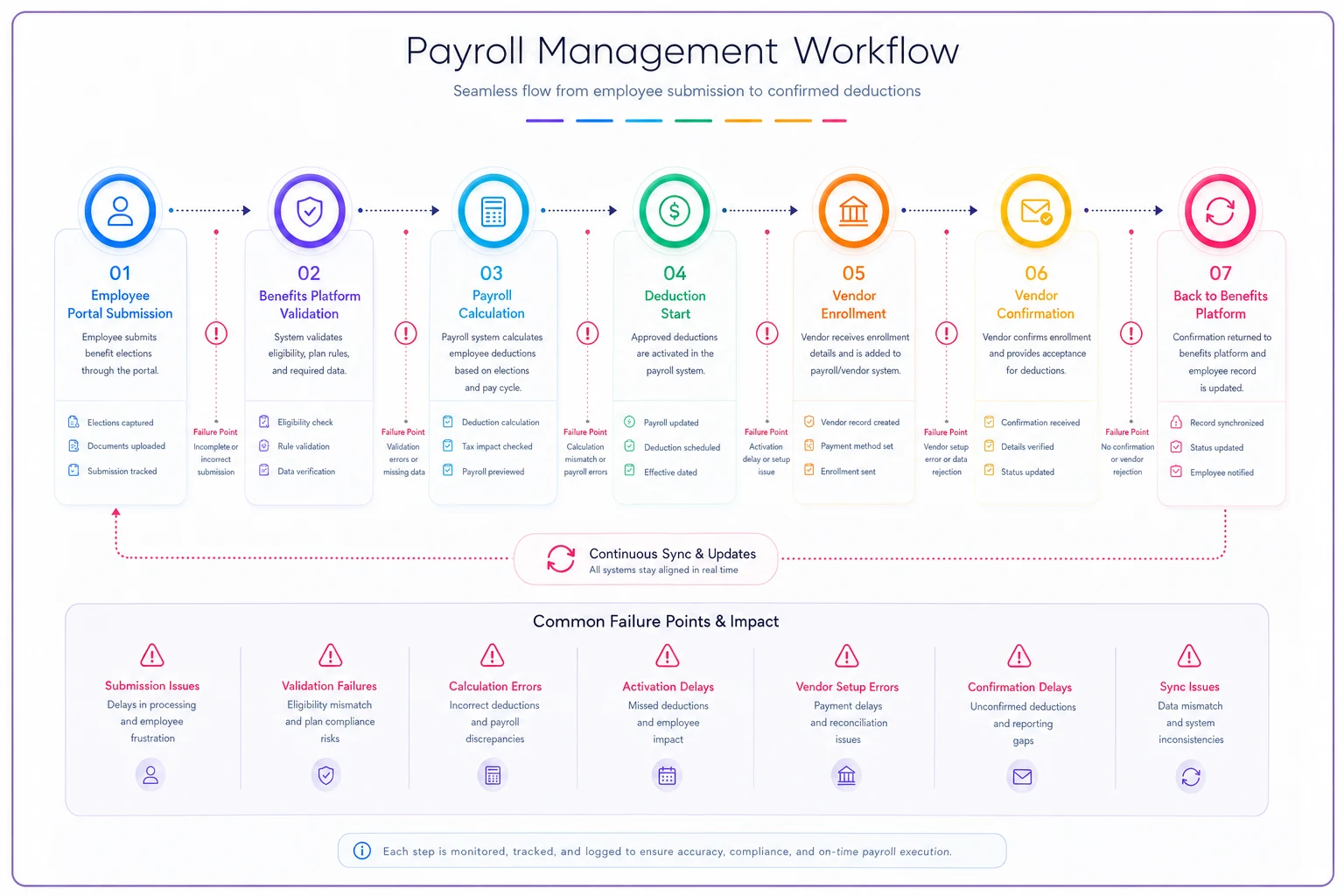
Map out your data flow:
-
Employee submits change in benefits portal
-
Benefits platform validates qualifying event
-
Approved change sends to payroll
-
Payroll calculates deduction amounts
-
Deduction starts on next available payroll
-
Confirmation sends back to benefits platform
-
Benefits platform sends enrollment to vendor
-
Vendor confirms enrollment
Each handoff is a potential failure point. The fix isn't more technology—it's clearer process definition. Build a field mapping document:
| Benefits Platform Field | Payroll Field | Transformation Logic |
|---|---|---|
| coverageeffectivedate | benefitstartdate | Same value |
| election_amount | annual_deduction | Same value |
| coverage_tier | deduction_code | Lookup table required |
| qualifyingeventdate | changereasondate | Same value |
| employee_contribution | perperiodamount | Calculate based on frequency |
The businesses handling this well use a staging table between systems. Changes land there first, get validated, transformed, then push to payroll. This creates an audit trail and a recovery point when things go sideways.
Retroactive pay corrections covers how to handle retroactive payroll adjustments broadly. Benefits retroactive changes need extra care specifically because of the pre-tax implications and vendor coverage requirements layered on top of the standard retroactive logic.
Building your mid-period change response team
Mid-period benefits changes touch too many systems for one person to own. You need defined roles with clear accountability.
Benefits Administrator: Owns qualifying event validation and effective date determination. Single source of truth for what changed and when.
Payroll Specialist: Owns deduction calculations and pre-tax compliance. Makes sure the math works and stays within IRS limits.
Vendor Relations: Owns enrollment file transmission and billing reconciliation. Keeps coverage active and bills accurate.
Employee Communications: Owns explaining changes to employees—especially when pro-ration or catch-up deductions show up in their checks without warning.
The team needs a shared tracking system—not email chains. An actual system where everyone sees the same information. Track employee name and ID, change type and qualifying event, key dates (event, notification, effective, processing), systems updated, validation status, open issues, and resolution notes.
Weekly sync meetings keep everyone aligned. A five-minute stand-up works fine: changes processed this week, issues encountered, upcoming changes, process improvements needed. Short enough that people actually show up for it.
The businesses that handle mid-period changes smoothly treat them as a core operational process, not an exception. They have SOPs, templates, and clear ownership. The ones struggling treat each change as a unique situation requiring a custom solution every time—and they're always behind.
Software automation for benefits change management
The volume and complexity of mid-period benefits changes pushes many businesses toward automated solutions at some point. Modern benefits administration platforms with AI-powered validation can catch effective date mismatches before they cascade through your systems. The operational software that works best maintains clear separation between benefits elections, payroll deductions, and vendor enrollments—while automatically reconciling between all three.
The automation sweet spot includes validation of qualifying events against documentation, flagging retroactive periods that exceed compliance windows, and calculating pro-rated amounts with pre-tax limit checking built in. But the real value comes from automated reconciliation—comparing deductions to elections to vendor bills without someone manually maintaining spreadsheets every month.
AI-assisted tools help most with exception detection. Instead of manually reviewing every change, the system surfaces anomalies: deductions that don't match elections, effective dates outside normal windows, contribution limits at risk of being exceeded. Your team focuses on resolution instead of hunting for problems across three different systems.
Workflow automation should support your SOP, not replace it. Automated alerts when changes need review, defined escalation paths for different issue types, audit trails for compliance documentation. The goal isn't to eliminate human oversight—it's to make that oversight more effective by surfacing the right information at the right time.
Mid-period benefits payroll changes will always carry some complexity. There's no way around the fundamental challenge of coordinating multiple systems with different timing requirements and different interpretations of the same effective date.
But with solid validation SOPs, clear pro-ration formulas, and systematic reconciliation processes, you can turn that complexity into a manageable workflow. The businesses that handle constant benefits changes well share three things: defined ownership for each part of the process, templates and formulas that handle the standard cases reliably, and continuous validation rather than trying to fix everything after the fact.
Your next mid-period benefits change is probably already in flight—an employee who got married last weekend, or someone whose spouse just lost employer coverage. Having the right processes ready means the difference between a clean adjustment and three weeks of cleanup work.
Ready to simplify your payroll operations?
Join 2,000+ businesses using Payexly to reduce payroll overhead, ensure compliance, and enhance employee satisfaction.