


Your payroll runs fine until someone earns a $42,000 commission that needs splitting across three departments, amortized over six months, and partially coded to a project that doesn't exist in your GL yet. Then your controller spends two days manually creating journal entries while month-end close gets pushed back again.
Regular wages and salaries usually aren't the problem. The payroll system dumps transactions into the GL, everything maps, reconciliation takes an hour. Non-standard payroll items are different — they show up irregularly, follow complex allocation rules, and often need manual intervention that creates errors downstream.
The pattern is pretty consistent across companies that manage complex comp structures cleanly: they build canonical mapping tables that handle edge cases before those edge cases become reconciliation nightmares.
Why Standard Payroll Mappings Fail for Complex Compensation
Standard payroll systems assume predictable patterns. Employee 1234 works in department 100, so their entire salary hits GL account 6100-100. Simple, clean, and completely wrong when reality gets complicated.
Take a software company paying quarterly commissions. Their sales rep closes a $180,000 deal in March, triggering a $9,000 commission. The deal includes implementation services (60%), annual licenses (30%), and professional services (10%). The commission needs to follow the revenue recognition pattern — split across multiple GL accounts and time periods.
The payroll system just sees a $9,000 commission payment and posts the full amount to the default commission expense account. Three months later, during audit prep, someone notices the GL doesn't match the commission accruals. The investigation begins.
This happens because payroll systems and GL systems speak different languages. Payroll thinks in employees, pay codes, and tax treatments. The GL thinks in accounts, departments, and reporting periods. When compensation gets complex, that translation breaks down.
Stock compensation makes it worse. An employee exercises options, triggering a $15,000 compensation expense — but the expense recognition started two years ago when the options were granted. The payroll system records the cash exercise. The GL needs the expense adjusted for prior accruals. Without proper mapping logic, these transactions create permanent reconciliation differences.
Building Canonical Mapping Tables That Actually Work
A canonical mapping table is the single source of truth for how payroll items translate to GL accounts. Not just the basic wage-to-expense mappings that everyone has — but the logic for handling edge cases.
Eliminate payroll errors and delays.
Payexly streamlines every payroll cycle ensuring accuracy and compliance.
- Automated payroll processing
- Real-time tax compliance
- Benefits & deductions management
No credit card required
Here's what an effective mapping structure looks like for a mid-sized company with complex compensation:
| Payroll Element | Trigger Condition | Primary GL Account | Allocation Logic | Amortization Rule |
|---|---|---|---|---|
| Base Salary | Standard pay run | 6100-[Dept] | Direct to home department | Current period |
| Sales Commission | Deal closed | 6150-000 | Split by revenue type % | Match revenue recognition |
| Spot Bonus | Manager approval | 6110-[Dept] | 70% home dept, 30% corporate | Current period |
| RSU Vesting | Vesting date | 6200-000 | Corporate pool | Straight-line from grant |
| ESPP Discount | Purchase date | 6210-000 | Corporate pool | Purchase period |
| Car Allowance | Monthly recurring | 6310-[Dept] | Direct to home department | Current period |
| Signing Bonus | First paycheck | 6120-000 | Amortize to home dept | 12-month straight-line |
The key difference between this and what most companies have is that the allocation and amortization logic is explicit, not implied. When that sales commission hits, the system knows exactly how to split it based on deal composition.
The table alone doesn't solve the problem. You need supporting processes that make the mapping operational.
Department Allocation Matrices
When an employee splits time between departments, their compensation needs to follow. Most companies handle this badly — either dumping everything to the home department or attempting manual allocations that never quite reconcile.
The fix is maintaining an allocation matrix that updates monthly. Employee 2345 works 60% on Project Alpha (Department 200) and 40% on corporate initiatives (Department 900). Their $8,000 monthly salary splits accordingly: $4,800 to 6100-200 and $3,200 to 6100-900. The matrix captures this split and applies it consistently across all compensation elements.
The canonical table needs versioning to handle these corrections without corrupting historical data.
Retroactive changes complicate things. Someone realizes in June that the allocation should have been 70/30 since April. This is where your retroactive pay correction process becomes critical. The canonical table needs versioning to handle these corrections without corrupting historical data.
Commission Amortization Schedules
Commissions rarely align with the period they're paid. A Q1 commission might relate to deals closing throughout Q4 of the prior year. Without proper amortization, your P&L shows spikes that don't reflect actual business performance.
The canonical mapping needs to link each commission payment to its underlying transaction. When the payroll run processes that $9,000 commission, the system should automatically create journal entries to spread it across the appropriate periods.
-
$89,000 for Q4 2023 deals (already accrued)
-
$34,000 for Q1 2024 deals (current period)
-
$24,000 for annual contracts (amortize over 12 months)
Without the canonical mapping, someone manually creates these entries every quarter. With it, the entries generate automatically with proper supporting documentation.
Here's a simple workflow visualization to show how a commission payment gets mapped, allocated, amortized, and converted into journal entries.
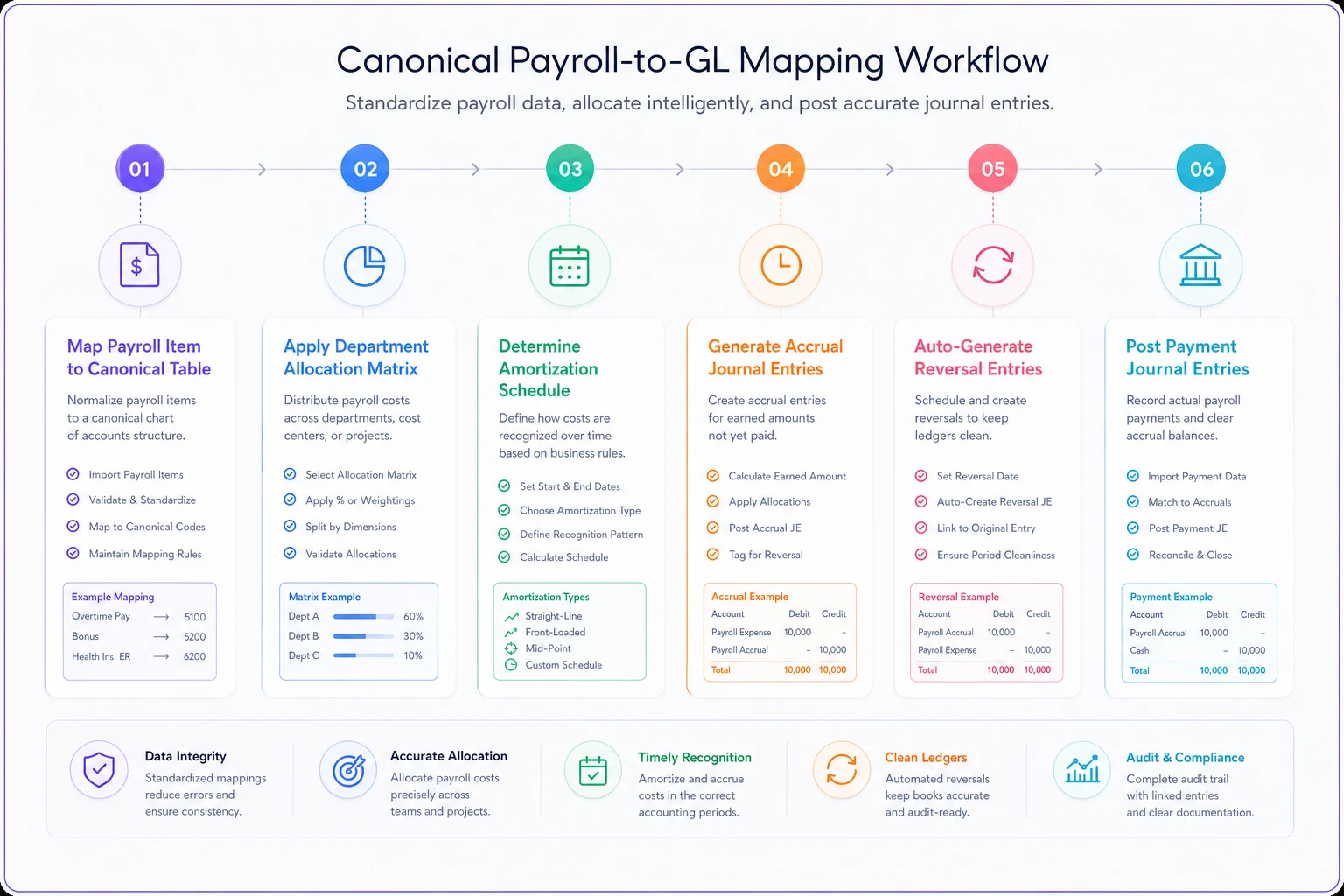
The diagram shows the mapping table lookup, allocation, amortization scheduler, and journal entry generator operating in sequence.
Journal Entry Templates for Complex Scenarios
Even with solid mapping tables, some scenarios need manual intervention. The difference between chaos and control is having tested templates ready before you need them.
Template 1: Multi-Department Commission Split
DR Commission Expense - Sales (6150-100) $4,500 DR Commission Expense - Implementation (6150-200) $2,700 DR Commission Expense - Support (6150-300) $1,800 CR Commission Payable $9,000 [Reversal of Accrual] DR Commission Accrual $9,000 CR Commission Expense - Sales (6150-100) $4,500 CR Commission Expense - Implementation (6150-200) $2,700 CR Commission Expense - Support (6150-300) $1,800
The template includes both the expense recognition and the accrual reversal, which prevents the common mistake of double-counting commissions.
Template 2: Equity Compensation with Prior Period Adjustments
[Monthly Vesting Entry] DR Stock Compensation Expense (6200-000) $3,750 CR Additional Paid-in Capital $3,750 [True-up for Forfeitures] DR Additional Paid-in Capital $1,250 CR Stock Compensation Expense (6200-000) $1,250
The template handles both regular vesting and forfeiture adjustments. Without this, accumulated errors make year-end equity rollforwards nearly impossible to reconcile.
Template 3: Retroactive Fringe Benefit Corrections
[Current Period Correction] DR Fringe Benefit Expense (6310-[Dept]) $890 CR Employee Benefits Payable $890 [Prior Period via Accrual] DR Fringe Benefit Expense - Prior Period (6390-000) $2,240 CR Accrued Benefits Adjustment $2,240
Separating current and prior period adjustments keeps your period comparisons clean while preserving the full reconciliation trail.
Reconciliation Checkpoints That Prevent Month-End Surprises
Solid mapping tables and journal templates don't help if reconciliation only happens at month-end. By then, errors have compounded and nobody remembers why that $3,400 adjustment was necessary.
Build reconciliation checkpoints throughout the payroll cycle:
Pre-Payroll Validation: Before approving the payroll run, validate that all non-standard items have corresponding GL mappings. This catches new commission structures or benefit types before they hit the books.
Post-Payroll Mapping Check: Within 24 hours of payroll processing, verify that all transactions mapped correctly. Look specifically for items hitting suspense accounts or default categories.
Weekly Amortization Review: Every Friday, review amortization schedules for reasonableness. A $50,000 commission suddenly amortizing over 36 months instead of 12 stands out in a weekly review but gets buried in month-end chaos.
Mid-Month Subsidiary Reconciliation: If you run separate payroll for different entities, reconcile intercompany payroll allocations mid-month. Finding a $15,000 discrepancy on day 15 beats finding it on day 31.
The checkpoint that catches the most issues is the post-payroll mapping check. Companies skip it because "the payroll posted successfully," but successful posting doesn't mean correct GL mapping. A ten-minute review here saves hours of investigation later.
Department-Specific Validation Rules
Generic validation catches obvious errors. Department-specific rules catch the subtle ones that auditors love to find.
Sales departments need different validation than engineering. A $25,000 monthly commission in sales is normal. The same amount in engineering signals a mapping error. Build these rules into your canonical tables:
Sales Department Rules:
-
Commissions can exceed base salary
-
Stock compensation typically higher than company average
-
Travel expenses expected monthly
Engineering Department Rules:
-
Commissions should be zero (except referral bonuses)
-
Stock compensation follows standard vesting schedules
-
Limited travel expenses, mainly for conferences
Operations Department Rules:
-
Overtime common and variable
-
Minimal commission payments
-
Fringe benefits include tool allowances
When payroll for an engineering manager includes a $15,000 commission, the validation rule triggers an investigation before the journal posts. Maybe it's a legitimate referral bonus. Maybe it's a miscoded signing bonus. Either way, you catch it before month-end.
These rules also support your broader payroll governance reviews, giving you clear standards for what "normal" looks like across departments.
Handling Retroactive Changes Without Breaking Historical Comparisons
Retroactive payroll adjustments happen constantly. A promotion approved in January doesn't get processed until March. A commission calculation error from Q4 surfaces in Q2. Benefits elections were entered incorrectly and need correction going back six months.
Most companies handle these by dumping everything into the current period, which destroys any meaningful period-over-period analysis. The canonical mapping table needs specific logic for maintaining historical accuracy while processing current-period adjustments.
Consider this scenario: in July, you discover a sales rep's commission rate should have been 3% instead of 2.5% starting in January. They're owed $8,400 in additional commissions. The wrong approach dumps $8,400 into July's commission expense. The right approach processes each period separately:
-
January adjustment
$1,400 to prior period adjustment account
-
February adjustment
$1,400 to prior period adjustment account
-
March–June adjustments
$5,600 to prior period adjustment account
-
July forward
Corrected rate applies normally
The GL shows the true commission expense for each period in the adjustment accounts, while the current period P&L stays clean. Trend analysis still works. Budget variance reports make sense. Your auditor sees a clear trail.
Building Buffer Accounts for Timing Differences
Perfect timing alignment between payroll and GL posting rarely exists. Payroll runs on the 15th and 30th. Month-end close happens on the 5th business day. Accruals estimate the gap, but estimates create variances.
Buffer accounts solve this cleanly. Instead of posting directly from payroll to final expense accounts, route through controlled buffer accounts that clear monthly:
Payroll posts → Buffer account → Final GL allocation
This seems like extra work until you realize it eliminates most "unexplained variances" during reconciliation. The buffer account holds timing differences while the canonical mapping ensures everything lands in the right place.
A concrete example: your March 30th payroll includes April 1–2 for hourly employees. Instead of complex accrual reversals, the buffer account holds the April portion until the April close. Clean books, no manual adjustments, audit trail intact.
Common Mapping Failures and Their Fixes
Even with solid processes, certain scenarios consistently break payroll-to-GL mappings. Knowing these patterns helps you build preventive controls.
The Terminated Employee Commission: Employee leaves in February but earns a Q1 commission paid in April. The payroll system can't find the employee, so the payment processes through accounts payable, which has no commission allocation logic. Fix: maintain a "terminated employee payroll" mapping specifically for these scenarios.
The Multi-Entity Allocation: Employee works across three legal entities within your company. Their payroll needs to split accordingly, but the payroll system only knows their primary entity. Manual journal entries attempt a fix monthly but are always slightly off. Fix: build entity allocation logic into your canonical tables with automatic intercompany entries.
The Retroactive Benefit Premium: Health insurance premiums increase retroactively to January, discovered in September. Nine months of adjustments need processing, but the benefit deduction codes have changed twice since January. Fix: version your mapping tables with effective dates, allowing historical lookups for retroactive processing.
The Project-Based Stock Grant: Engineering team receives retention grants tied to specific project completion. The expense needs to follow project accounting, not standard department allocation, but the payroll system has no concept of projects. Fix: create a secondary mapping layer that translates payroll departments to project codes based on employee assignments.
When Manual Intervention Makes Sense (And When It Doesn't)
Not everything should be automated. Some scenarios legitimately need human judgment.
Automate these:
-
Regular commission allocations based on deal type
-
Standard fringe benefit amortization
-
Department splits for shared employees
-
Monthly equity vesting entries
Keep manual:
-
One-time signing bonuses with unusual terms
-
Executive compensation with board-approved special provisions
-
Settlement payments requiring legal review
-
Corrections requiring prior period restatements
The dividing line is repeatability and risk. If it happens monthly and follows consistent rules, automate it. If it's unique or requires judgment, keep human control — but support it with templates and checklists.
Audit-Ready Documentation Standards
When auditors review payroll-to-GL reconciliation, they focus on non-standard items. Your canonical mapping documentation needs to anticipate their questions.
Essential documentation elements:
-
Approval matrix showing who can authorize non-standard payments
-
Change log for mapping table updates with business justification
-
Sample calculations for complex allocations
-
Monthly certification that mappings were reviewed and validated
Documentation isn't just for auditors. When your controller leaves and their replacement needs to understand why signing bonuses amortize over 18 months instead of 12, the documentation provides that context. It's institutional memory — and it's surprisingly rare to find it maintained well.
Making It Operational with the Right Tools
Manual mapping table maintenance in Excel works until it doesn't. That breaking point usually arrives during your busiest period when nobody has time to fix anything properly.
Modern payroll operations platforms handle canonical mapping as a core function — maintaining versioning, automating allocations, generating journal entries without manual intervention. When a complex commission structure needs splitting across departments and periods, the system handles it based on pre-defined rules rather than someone's memory of how it was done last quarter.
The real value comes from reconciliation automation. Instead of manually comparing payroll registers to GL postings, the platform continuously validates that mappings executed correctly. Exceptions get flagged immediately rather than surfacing during month-end close.
These platforms also handle retroactive adjustments more reliably. They maintain the full history of mapping rules, so when you discover a Q2 error in Q4, the system can recreate the exact mappings that should have applied and generate correcting entries automatically — without someone piecing it together from notes in a shared drive.
Moving from Reactive to Proactive Mapping Management
Companies with clean books don't necessarily have simpler compensation structures. They have better mapping discipline. They update their canonical tables before new compensation types go live, not after the first reconciliation breaks.
That means involving payroll and accounting early when HR designs new compensation plans. An innovative commission structure might motivate the sales team, but if it requires 20 manual journal entries every month, the operational cost can easily outweigh the motivational benefit.
Start with your next non-standard payroll item. Before it processes, document the GL mapping logic. Build the journal entry template. Set up the reconciliation checkpoint. Test it with a smaller amount first if you can. This incremental approach builds your canonical mapping infrastructure without disrupting current operations.
The goal isn't perfection on day one. It's having a clear, documented, testable process for complex payroll items that doesn't depend on one person's knowledge or availability. When month-end arrives and your GL ties to payroll without heroic manual effort, the value of that investment becomes pretty obvious — to your team, your auditors, and anyone reading your financial statements.
The goal isn't perfection on day one. It's having a clear, documented, testable process for complex payroll items that doesn't depend on one person's knowledge or availability. When month-end arrives and your GL ties to payroll without heroic manual effort, the value of that investment becomes pretty obvious — to your team, your auditors, and anyone reading your financial statements.
Ready to simplify your payroll operations?
Join 2,000+ businesses using Payexly to reduce payroll overhead, ensure compliance, and enhance employee satisfaction.