

Most payroll outsourcing decisions get made on the wrong number. Someone pulls up the vendor quote, sees "$14 per employee per month," multiplies by headcount, compares it against two internal salaries, and calls it a day. Six months later the invoice is 40% higher than the quote, there are three "implementation" line items nobody budgeted for, and the internal team that was supposed to shrink is now spending twenty hours a week babysitting the vendor's exceptions.
The per-employee price is almost never the real cost. And the real cost isn't even the biggest problem — the biggest problem is that most sourcing decisions ignore risk entirely, or treat it as a vague footnote ("they seem reliable"). A vendor can be cheap and still expose you to a mis-filed 941 that turns into a five-figure penalty, or a data breach that eats your legal budget for a year.
This is a framework for making the decision like an operator, not a purchasing clerk. We'll build a payroll outsource decision framework around three connected pieces: a repeatable total-cost-of-ownership (TCO) model, a risk-weighted scorecard that forces you to price the downside, and a phased consolidation playbook for when you've inherited a mess of overlapping vendors. The goal is to make the tradeoffs visible before you sign, not after.
Why the standard comparison falls apart
The reason so many of these decisions go sideways isn't stupidity — it's that the costs are structurally hidden across different budgets and different teams.
When you outsource payroll, the vendor invoice lands in finance. But the cost to serve that vendor relationship shows up everywhere else. HR spends time reconciling exceptions. IT spends time on the SSO integration and the annual security review. The controller spends time in month-end reconciliation because the vendor's GL export never quite matches your chart of accounts. None of those hours show up on the vendor's PDF, so none of them get compared.
This usually becomes a problem once a company grows past the point where one person "just knows how payroll works." At 40 employees, the office manager runs it in a couple of days a month and nobody tracks the true cost. At 250 employees across three states, that same informal process is now spread across four people who each think payroll is 10% of their job — which means it's really about 0.4 of a full-time role that nobody is measuring or managing.
That's the trap. Keeping it in-house looks free because the labor is buried in other roles. Outsourcing looks expensive because it's a clean, visible invoice. You're comparing a hidden cost against a transparent one, and the transparent one always looks worse even when it isn't.
Building a repeatable cost-to-serve model
A TCO model only works if you can run it again next year and against the next vendor without rebuilding it from scratch. The point is to define cost categories once, then plug numbers in.
Eliminate payroll errors and delays.
Payexly streamlines every payroll cycle ensuring accuracy and compliance.
- Automated payroll processing
- Real-time tax compliance
- Benefits & deductions management
No credit card required
Break the total cost into five buckets:
-
Direct vendor fees — the base per-employee/per-run charge, plus the stuff that hides in the fine print: year-end processing, W-2/1099 fees, off-cycle run charges, tax filing fees per jurisdiction, garnishment processing, and "custom report" fees.
-
Implementation and switching costs — data migration, parallel-run testing, integration build, and the internal hours to validate the first three cycles. This is a one-time cost but it's often 3–6 months of recurring fees crammed into one quarter, and people forget to amortize it.
-
Internal labor to operate the relationship — exception handling, approvals, reconciliation, answering employee questions the vendor's helpdesk bounced back. This is the number everyone skips.
-
Integration and IT overhead — SSO, API maintenance, the annual security assessment, and whatever breaks when the vendor pushes an update.
-
Risk-adjusted expected loss — the dollar value of things that go wrong times how often they go wrong. More on this in the next section, because this is where the real money is.
The discipline that makes it repeatable: assign an owner and a data source to each bucket. Direct fees come from the contract. Internal labor comes from an actual time estimate gathered over two or three pay cycles, not a guess. Once you've defined the buckets, next year's re-evaluation is a two-hour exercise instead of a two-week project.
The discipline that makes it repeatable: assign an owner and a data source to each bucket.
A quick example of how differently this reads once you fill it in. Say you're evaluating a mid-tier vendor for a 200-person company:
| Cost bucket | Annual (in-house) | Annual (outsourced) |
|---|---|---|
| Direct fees / software | ~$9k (software licenses) | ~$38k–$45k |
| Implementation (amortized over 3 yrs) | — | ~$8k/yr |
| Internal labor | ~$95k (1.2 FTE loaded) | ~$34k (0.4 FTE managing vendor) |
| Integration / IT | ~$6k | ~$4k |
| Risk-adjusted expected loss | ~$18k | ~$7k |
| Total | ~$128k | ~$96k |
On the naive comparison — $9k software vs. $45k vendor — in-house wins by a mile. On the full cost-to-serve, outsourcing is cheaper and less risky. The point isn't that outsourcing always wins. It's that the answer flips depending on which costs you're honest about.
Pricing the downside: risk-weighted scorecards
Cost is only half the decision. The other half is: what happens when this goes wrong, and how likely is that?
Most people evaluate vendor risk qualitatively — a gut feeling about how "solid" a vendor seems. That's useless for comparison because you can't weigh a gut feeling against a dollar figure. The fix is a scorecard that converts risk into an expected-loss number you can drop straight into the TCO model.
For each risk category, estimate two things: the potential impact if it happens (in dollars) and a rough probability. Multiply them and you get an expected annual loss. Do it for every vendor and every option, including staying in-house.
-
Compliance / filing failure — late or wrong tax deposits, missed multi-state registrations, penalty exposure.
-
Data security — breach, unauthorized access, mishandled PII. This one has both direct cost and reputational cost.
-
Business continuity — what happens to a pay run if the vendor has an outage the day before payday.
-
Accuracy / error rate — the drip of small corrections that erode trust and eat labor hours over time.
-
Concentration / lock-in — how painful and expensive it is to leave if the relationship sours.
-
Financial stability of the vendor — a payroll provider going under mid-quarter is a genuine operational nightmare.
A practical scoring approach: rate each category 1–5 on impact and 1–5 on likelihood, then translate the impact score into a dollar band you've defined in advance (a "5" on compliance might mean $50k+ in penalties and remediation). Weight the categories — compliance and security should carry more weight than a slightly higher error rate — and sum it up.
The insight most teams miss: the cheapest vendor and the riskiest vendor are frequently the same one. A provider hits a low price by running thin support, minimal jurisdiction coverage, and lean security. That cheapness is the risk. Scoring forces that connection into the open instead of letting price and risk sit in separate conversations. This is the same thinking behind a mature payroll vendor management operating model — you're not just picking a vendor, you're pricing the ongoing exposure of depending on one.
Vendor tiers, and matching them to your actual needs
Not every company needs the same tier of vendor, and overbuying is as common a mistake as underbuying. A 60-person single-state company paying enterprise-suite prices for capabilities it will never use is wasting money just as surely as a 400-person multi-state company running on a bargain provider that can't handle its filing complexity.
Tier 1 — Full-service enterprise providers. Deep multi-jurisdiction coverage, strong compliance infrastructure, integrations with everything, dedicated account teams. You pay for it. Makes sense when you have real complexity: many states, complex benefits, union rules, or a headcount trajectory that will hit these problems soon anyway.
Tier 2 — Mid-market platforms. Solid tax filing, decent integrations, self-serve plus some support. Good coverage for most companies in the 100–500 range without exotic requirements. This is where most midmarket teams should be looking first.
Tier 3 — Lightweight / low-cost processors. Cheap, simple, limited jurisdiction depth, thin support. Fine for small, single-state, low-complexity operations. Dangerous for anyone with real compliance exposure, because the risk-weighted cost quietly balloons even though the invoice stays small.
The pattern worth flagging: companies tend to pick their tier based on where they are today and get burned when they grow into a tier they didn't provision for. A company adding two states a year should not sign a Tier 3 provider on a three-year contract. Run the TCO and risk scorecard against your headcount and geography 18 months out, not just current state.
The negotiation checklist
Once you've picked a tier and a shortlist, the contract is where the hidden costs either get locked down or get left as landmines. Go into the negotiation with this list and don't sign until each item has a clear answer in writing:
-
All-in pricing — get every per-transaction fee named
off-cycle runs, corrections, W-2 reissues, terminations, garnishments, amended filings. Ask for a sample invoice with your actual volume.
-
Price escalation caps — a cap on annual increases, in writing. "Market rate" adjustments are how a good deal becomes a bad one in year three.
-
Implementation scope and ownership — who does the data migration, who validates it, how many parallel runs are included, and what happens if the go-live slips.
-
SLA teeth — response times and remedies. An SLA with no penalty for missing it is a suggestion, not a commitment.
-
Tax filing liability — spell out who eats the penalty when a filing is late or wrong due to vendor error. This clause alone can be worth more than the entire price difference between two vendors.
-
Data ownership and exit — you own your data, you can export it in a usable format, and there's a defined offboarding process with a timeline. Never sign without a clean exit.
-
Security and audit rights — SOC reports, breach notification timelines, and your right to review controls.
-
Termination terms — notice period, early-termination fees, and continuity of service through a transition.
The single most valuable clause to fight for is the tax filing liability language. A vendor that won't stand behind its own filings is telling you exactly how much confidence it has in them.
A phased consolidation playbook
A lot of midmarket teams aren't choosing one vendor from scratch — they're untangling three or four that accumulated through growth and acquisitions. One PEO for the legacy business, a separate processor from an acquired company, a contractor-payments tool nobody remembers signing up for. Consolidation is where the biggest savings usually hide, but ripping everything out at once is how you cause a missed payday.
Do it in phases:
-
Inventory and map. List every vendor, what it covers (which entities, which states, which worker types), what it costs all-in, and what it's integrated with. You almost always find overlap and at least one thing nobody's actively managing.
-
Score the current state. Run each existing vendor through the risk scorecard. This tells you which relationship is the most dangerous to keep — which usually isn't the most expensive one.
-
Pick the target model. One vendor for everything, or a deliberate two-vendor split (say, one for employees, one for contractors) if the complexity genuinely warrants it. Decide this on TCO and risk, not on which incumbent is loudest.
-
Sequence the migration by risk, not by size. Move the lowest-complexity, lowest-risk population first as a proving ground. Learn on the group where a mistake is recoverable before you touch the group where it isn't.
-
Run parallel and validate. Full parallel runs for at least two cycles per migrated population, with reconciliation against the old system down to the penny before you cut over.
-
Decommission deliberately. Keep read access to old systems through year-end so you can produce clean W-2s and answer any tax notices. Don't kill access the day after cutover.
The mistake we see most often in consolidation is sequencing by headcount — moving the biggest group first "to get the savings faster." That's backwards. The biggest group is where a migration error hurts the most people and creates the most cleanup. Move it last, once your process is proven.
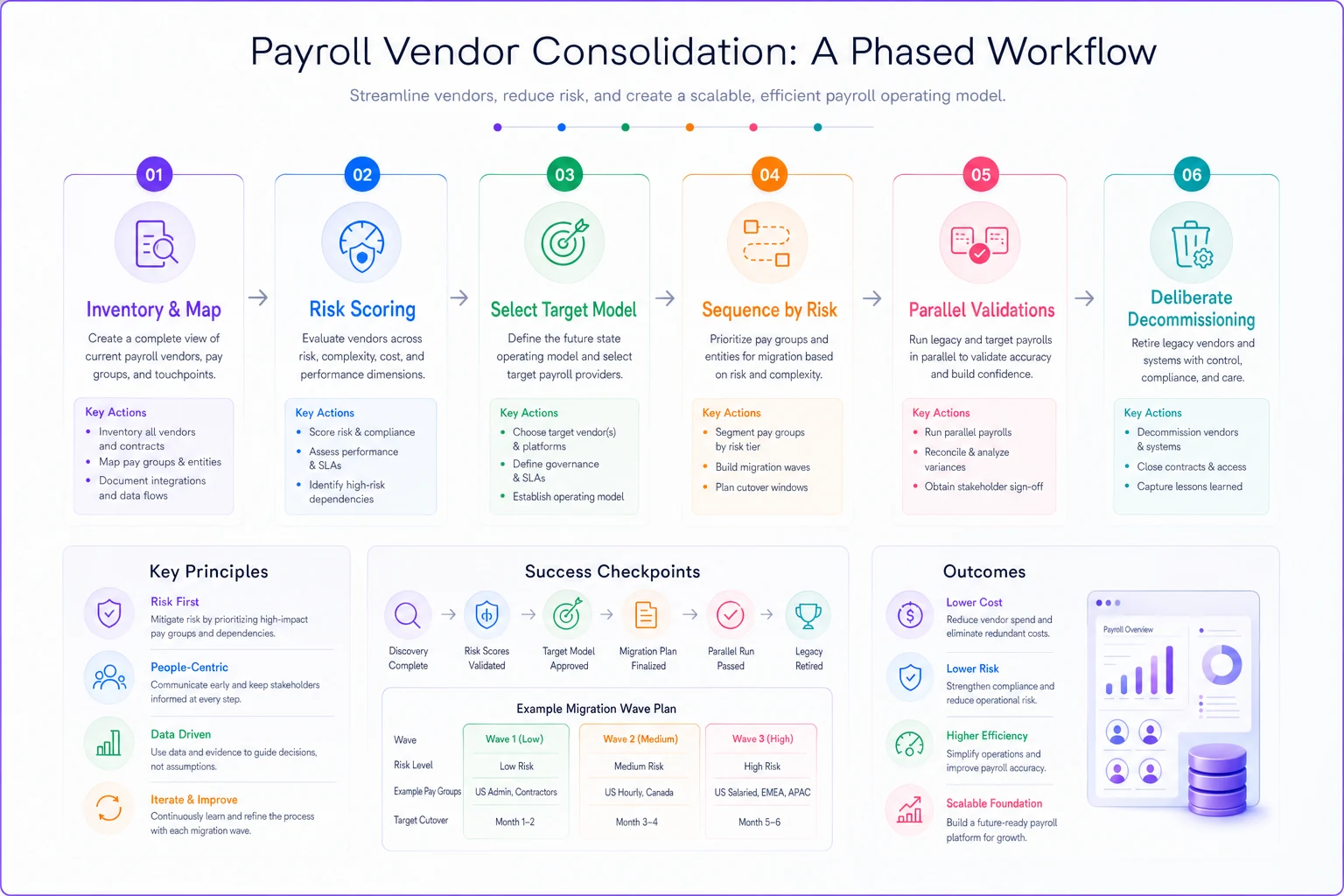
A visual workflow of the phased consolidation steps.
Consolidation also only holds up if the governance around it is solid — clear ownership of who approves what, and a documented process for exceptions. If that's shaky, a good payroll governance framework is worth putting in place before you start moving vendors, not after.
A real scenario
A regional healthcare services company, roughly 280 employees across four states, came out of two acquisitions with three payroll setups running at once. Visible spend was around $61k a year in vendor fees, which leadership thought was fine.
The problem wasn't the fee. It was that reconciliation between the three systems took one senior accountant close to a full week every month, and a missed state registration in one of the acquired entities had already generated about $9k in penalties over eighteen months. When they ran the full cost-to-serve, the true annual number was closer to $140k once internal labor and risk were counted.
They consolidated onto a single Tier 2 platform over about five months — smallest entity first, biggest last, two parallel cycles each. Vendor fees actually went up, to roughly $74k. But the monthly reconciliation dropped from a week to about a day and a half, the multi-state filing exposure effectively went to near zero, and the senior accountant got roughly three days a month back for actual finance work. Net, the all-in cost landed somewhere around $101k — and the risk profile was dramatically calmer. The headline vendor price went the "wrong" way and it was still clearly the right call.
When outsourcing makes sense, and when it doesn't
When it makes sense: you have real multi-jurisdiction complexity, your internal labor cost is quietly higher than you admit, payroll expertise is concentrated in one person you can't afford to lose, or you're growing fast enough that in-house won't keep up. In those cases the risk-adjusted math usually favors a good vendor.
When it's a bad idea: you have a simple, single-state, stable operation with a competent internal owner and good controls. Outsourcing that can add cost and coordination overhead without removing meaningful risk. Small and simple often really is cheaper to keep in-house — the mistake is assuming that's still true at 250 employees when it probably stopped being true around 120.
Who should not do this without more prep: anyone who can't yet articulate their true internal labor cost or their current error rate. If you don't know your baseline, you can't tell whether a vendor improved anything. Spend a month measuring before you shop.
Pulling it together
The whole point of a real payroll outsource decision framework is to stop comparing invoices and start comparing systems. The vendor fee is one line in a five-part cost structure, and it's usually not the line that decides whether the relationship is worth it. Internal labor and risk-adjusted loss are where the decision actually lives — and those are exactly the numbers that get left off the spreadsheet.
Build the cost-to-serve model once so you can rerun it. Score risk in dollars so it can sit next to cost instead of getting hand-waved. If you're consolidating, sequence by risk and prove your process on the small stuff before you touch the group that matters most. Do that, and the decision stops being a gamble on a quote and becomes something you can actually defend when the invoice shows up higher than expected — because you'll already know exactly what you're paying for, and what you're avoiding.
The whole point of a real payroll outsource decision framework is to stop comparing invoices and start comparing systems. The vendor fee is one line in a five-part cost structure, and it's usually not the line that decides whether the relationship is worth it. Internal labor and risk-adjusted loss are where the decision actually lives — and those are exactly the numbers that get left off the spreadsheet.
Build the cost-to-serve model once so you can rerun it. Score risk in dollars so it can sit next to cost instead of getting hand-waved. If you're consolidating, sequence by risk and prove your process on the small stuff before you touch the group that matters most. Do that, and the decision stops being a gamble on a quote and becomes something you can actually defend when the invoice shows up higher than expected — because you'll already know exactly what you're paying for, and what you're avoiding.
Ready to simplify your payroll operations?
Join 2,000+ businesses using Payexly to reduce payroll overhead, ensure compliance, and enhance employee satisfaction.