



If you run payroll for a 300-person SaaS company, you already know the vendor landscape is noisy. Every provider claims multi-state coverage, automated filing, and "seamless integrations." The problem isn't finding options — it's cutting through forty near-identical demo decks to a shortlist you can actually defend when finance asks why you picked vendor X over the one their buddy uses.
This guide gives you a scoring method, a realistic shortlist of five, price ranges that aren't fantasy, and the questions that actually separate vendors once the sales polish wears off. It's built specifically for the SaaS profile: people spread across many states, equity comp in the mix, a real HRIS, and an engineering team that will absolutely judge your vendor's API.
## The decision model: three dimensions, weighted for your situation
Most buyer's guides rank vendors on a vague "overall score." That's useless when you have to justify a six-figure multi-year contract. Score on three dimensions instead — ones that map to how payroll actually fails or succeeds at this size.
Cost — not just the per-employee-per-month (PEPM) sticker, but implementation fees, module add-ons (benefits admin and tax filing are frequently separate SKUs), and the cost of off-cycle runs. SaaS companies run more off-cycles than they expect, between equity events and commission true-ups.
Compliance capability — this is where multi-state bites. A company with people in 22 states is filing in 22 states, plus local jurisdictions in places like Ohio, Pennsylvania, and Colorado. The question isn't "do you file," it's "do you register me, handle local jurisdictions, and own the penalty if you file late."
Implementation time — the difference between a vendor you can be live on in 6 weeks versus one that drags to 16 weeks is real money and real risk, especially if your contract with the incumbent has a hard end date.
| Dimension | Weight | Why this weight for SaaS at 300 heads |
|---|---|---|
| Compliance capability | 45% | Multi-state exposure is your single biggest penalty risk. One missed state registration can cost more than a year of PEPM savings. |
| Implementation time | 30% | You're migrating off something. A slow cutover overlaps two systems and burns your team. |
| Cost | 25% | It matters, but at this size the price delta between serious vendors is smaller than people assume. |
If your company is heavily concentrated in one or two states, shift some weight from compliance to cost. The model should bend to your footprint, not the other way around.
## Scoring each dimension (so the shortlist is reproducible)
The point of a transparent methodology is that someone else on your team could run it and land on roughly the same five. Here's how to score each dimension on a 1–5 scale.
Eliminate payroll errors and delays.
Payexly streamlines every payroll cycle ensuring accuracy and compliance.
- Automated payroll processing
- Real-time tax compliance
- Benefits & deductions management
No credit card required
Compliance scoring (1–5)
-
Does the vendor handle state and local tax registration on your behalf, or just filing once you're registered? (This gap burns people constantly.)
-
Who assumes liability for filing errors — them or you? Get the penalty-coverage language in writing.
-
Local jurisdiction depth
school district taxes, city taxes, SUI rate management across states.
-
New-hire reporting automation per state.
-
How quickly they add new jurisdictions when you hire your first person in a new state.
A vendor scores a 5 only if they register you, file everything, cover local jurisdictions automatically, and put penalty liability on themselves.
Implementation scoring (1–5)
-
Realistic go-live timeline for 300 employees with historical data migration.
-
Parallel-run support — do they run one cycle alongside your old system before cutover?
-
Dedicated implementation manager vs. a shared queue.
-
Quality of data migration tooling — can they import YTD wages and prior filings cleanly, or is it a spreadsheet exercise you own?
Cost scoring (1–5)
-
All-in PEPM with benefits admin and tax filing included.
-
Implementation fee as a one-time cost.
-
Off-cycle and correction run fees.
-
Contract flexibility — annual lock vs. monthly, and what happens when headcount drops.
Score, multiply by weight, total it. That's your defensible ranking.
## The five-vendor shortlist (by profile, not by hype)
Rather than name-dropping brands that change features and pricing every quarter, this guide shortlists by vendor archetype — because the archetype is what stays stable, and you can map current vendors onto it when you run your RFP. At 300 employees with these requirements, your serious candidates fall into five recognizable buckets.
1. The modern all-in-one HR + payroll platform
-
Best at fast implementation, benefits admin, employee self-service.
-
Watch for API depth can be shallower than engineering expects. Local jurisdiction coverage is sometimes thinner than enterprise suites.
-
Typical all-in PEPM roughly $12–$18 per employee/month with benefits admin and tax filing bundled.
2. The dedicated payroll + PEO-adjacent provider
-
Best at compliance depth, penalty coverage, multi-state registration.
-
Watch for older interfaces, benefits admin may be an add-on module, API-first is not their native language.
-
Typical all-in PEPM around $10–$16 per employee/month, with tax filing included but benefits admin sometimes separate.
3. The enterprise HCM suite (scaled down)
-
Best at compliance depth, reporting, handling complex comp.
-
Watch for implementation can stretch to 12–16+ weeks, and the cost of configuration consultants adds up fast.
-
Typical all-in PEPM $14–$22 per employee/month, plus meaningful implementation fees.
4. The API-first / developer-friendly platform
-
Best at HRIS integration, data contracts, automation-friendly workflows.
-
Watch for compliance maturity varies — pressure-test their multi-state and local jurisdiction coverage hard. Newer vendors sometimes under-deliver on registrations.
-
Typical all-in PEPM $12–$20 per employee/month.
5. The global/EOR-capable platform (if you have international hires)
-
Best at international coverage, contractor payments across countries.
-
Watch for US multi-state depth can be a secondary priority for these vendors. Domestic local jurisdictions sometimes lag.
-
Typical all-in PEPM varies widely; US employees often $15–$25, international seats materially higher.
Most 300-person SaaS companies end up choosing between archetype 1 and archetype 4, with archetype 2 as the compliance-first safety pick. Archetype 3 wins when your comp structure is genuinely complex, and archetype 5 only enters if you've gone international.
## Deployment scenarios: match the archetype to your reality
The right choice depends less on the vendor and more on your company's shape.
Scenario A — Heavy remote, 20+ states, mostly salaried, equity-rich. Compliance weight goes up. Prioritize archetype 2 or a mature archetype 1. The number of jurisdictions is your real risk. Make penalty coverage a hard requirement.
Scenario B — Concentrated in 2–3 states, strong internal eng team, heavy automation goals. Archetype 4 shines here. Lower compliance surface area means you can lean into API quality and data integration without multi-state risk dominating the decision.
Scenario C — Fast-growing, frequent off-cycles from commissions and equity events. Watch off-cycle fees closely. A vendor at $13 PEPM with free off-cycles can beat one at $11 PEPM that charges $150 per off-cycle run when you're doing six a quarter.
## A realistic cost picture
For 300 employees, here's roughly what annual payroll platform spend looks like across the serious archetypes — PEPM plus a one-time implementation fee amortized so you can compare apples to apples.
| Archetype | All-in PEPM range | Est. annual PEPM cost (300 ee) | Typical implementation fee |
|---|---|---|---|
| Modern all-in-one | $12–$18 | ~$43k–$65k | $2k–$8k |
| Payroll + PEO-adjacent | $10–$16 | ~$36k–$58k | $1k–$5k |
| Enterprise HCM | $14–$22 | ~$50k–$79k | $8k–$25k+ |
| API-first platform | $12–$20 | ~$43k–$72k | $2k–$10k |
Two things people consistently miss. First, the quoted PEPM almost never includes everything — benefits admin, time tracking, and advanced reporting are frequently separate line items, and they can add $3–$6 PEPM. Second, implementation fees are negotiable at this deal size. If you're signing a multi-year contract for 300 seats, pushing to have implementation waived or halved is entirely reasonable.
## The vendor questions that actually matter
Skip the generic demo questions.
-
"We have employees in [list your exact states]. Which of these do you handle local jurisdiction filing for, and which require us to manage?" Make them answer state by state. Vague answers are a red flag.
-
"If you file late or incorrectly, who pays the penalty — and show me where that's written in the contract."
-
"When we hire our first employee in a new state, do you register us, or do we?" This single gap causes more scrambling than almost anything else.
-
"Walk me through your API for [the specific HRIS we use]. Can I see the docs right now?" If they can't show live docs, your engineers will struggle later.
-
"What's your realistic go-live timeline for 300 employees migrating from [current vendor], including a parallel run?"
-
"How do you handle equity comp events — ISO/NSO exercises, RSU vesting — for tax calculation and reporting?" SaaS-specific and frequently fumbled.
-
"What are your fees for off-cycle runs, voids, and corrections?"
-
"What happens to pricing if our headcount drops 15% in a downturn?" Not hypothetical for SaaS. If you're planning structural changes, our playbook on AI-driven headcount changes covers how those decisions ripple into payroll and compliance.
These are the ones that expose real differences:
## RFP checklist
Before you send anything out, make sure your RFP captures:
-
[ ] Full list of states (and known local jurisdictions) you operate in today, plus states you expect to enter in the next 12 months
-
[ ] Current headcount, exempt/non-exempt split, and contractor count
-
[ ] Your HRIS and the specific integration method required (API, SFTP, native connector)
-
[ ] Benefits carriers and whether you need the vendor to manage carrier feeds
-
[ ] Equity comp requirements and reporting needs
-
[ ] Required go-live date and your incumbent contract end date
-
[ ] Penalty-liability language as a scored, non-negotiable item
-
[ ] All-in pricing requirement (force them to itemize every add-on)
-
[ ] Off-cycle and correction fee schedule
-
[ ] Data migration scope — who owns YTD and historical filing migration
-
[ ] Parallel-run commitment
-
[ ] SOC 2 report and data security documentation
A common mistake: teams send an RFP that only asks about features, then get surprised by fees and liability gaps during contracting. Put the uncomfortable questions — penalties, pricing on headcount change, off-cycle fees — directly in the RFP so the answers are on record.
## Migration and implementation tips tailored to SaaS orgs
Switching payroll vendors is where good decisions go to die. A few things that materially reduce pain:
Time your cutover to a quarter boundary, ideally year-start. Migrating mid-year means carrying YTD wages, YTD tax withholding, and prior filings into the new system — doable, but error-prone. A January 1 cutover with clean YTD is dramatically simpler. If you can't wait, demand the vendor own the YTD migration and validate it against your last filed returns.
Time your cutover to a quarter boundary, ideally year-start.
Insist on a parallel run. Run at least one full cycle in the new system alongside the old one before you cut over. Compare gross-to-net per employee, tax withholdings, and total liability. If the numbers don't tie out, you found the problem before real paychecks were wrong instead of after.
Validate state registrations before the first live run. The number one migration failure at multi-state SaaS companies: the new vendor isn't registered in a state yet, so that state's taxes don't file correctly on the first run. Build a state-by-state registration checklist and confirm each one is active.
Loop in engineering early for the HRIS integration. Don't treat the API integration as an afterthought you handle in week five. Have your engineers review the API docs during vendor selection, not after you've signed. A clean integration means new hires, terminations, and comp changes flow automatically instead of being re-keyed.
Keep your old system read-accessible for a year. You'll need historical data for audits, amended returns, and the inevitable employee question about a paystub from eight months ago.
A simple migration sequence that works:
-
Sign contract with locked go-live date and penalty language.
-
Kick off with a dedicated implementation manager; hand over employee data and historical filings.
-
Confirm all state and local registrations are active in the new system.
-
Engineering builds and tests the HRIS integration in a sandbox.
-
Run one full parallel cycle; reconcile gross-to-net and tax liability line by line.
-
Resolve every discrepancy before cutover — no exceptions.
-
Go live on the clean boundary date; keep old system in read-only mode.
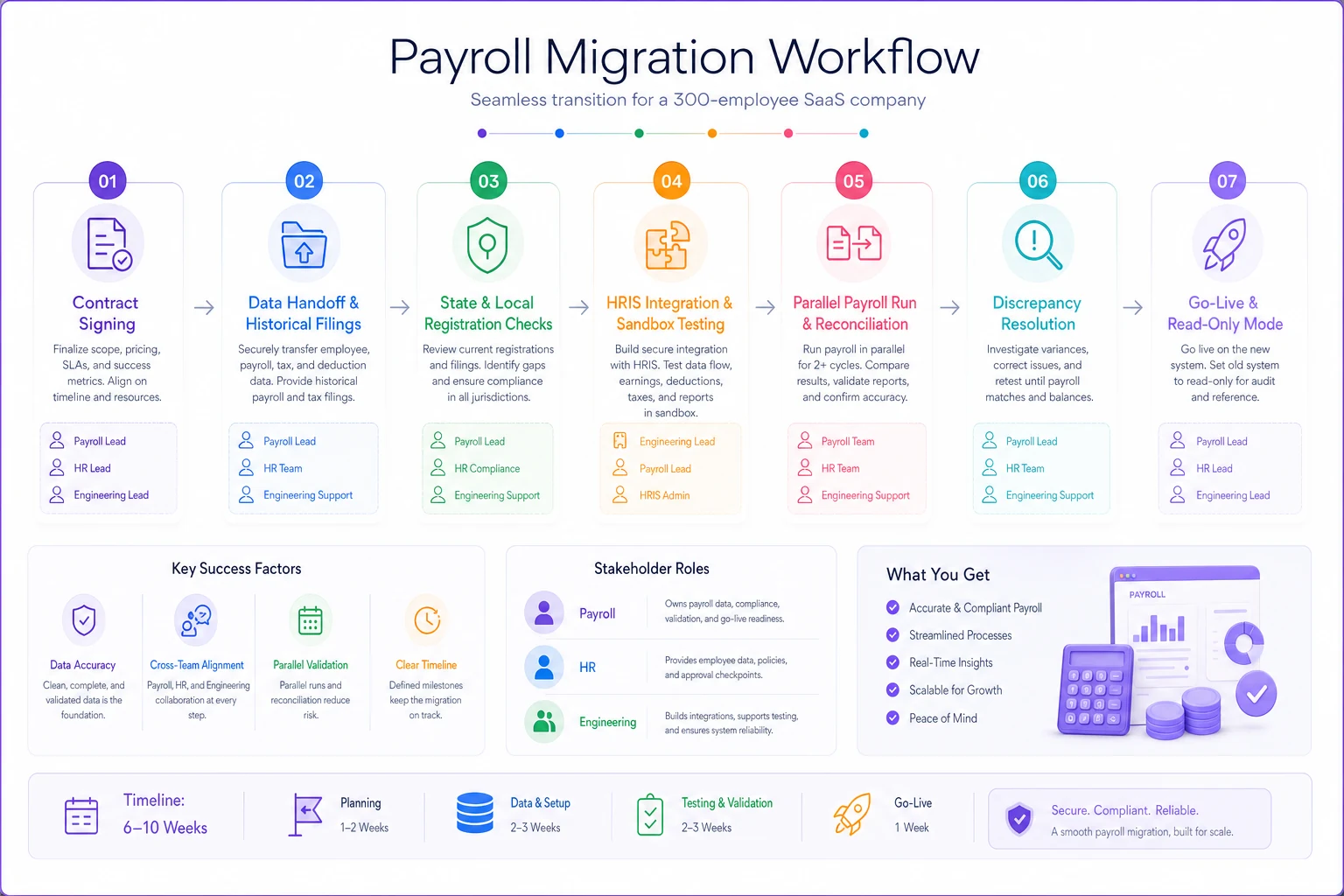
Following this sequence won't guarantee a perfect migration, but it eliminates the most common failure points that derail teams mid-cutover.
## A short real scenario
A roughly 300-person B2B SaaS company with employees in 19 states was on an older payroll provider that filed federal and state taxes but didn't handle local jurisdictions in several states or manage new-state registrations. Over about a year, two late local filings and one missed state registration generated penalties and interest somewhere in the $9k–$12k range — plus a lot of unbudgeted hours cleaning it up.
When they ran a structured RFP weighted toward compliance (45%), the cheapest vendor on paper scored third once penalty liability and local jurisdiction coverage were factored in. They chose a vendor roughly $1.50 PEPM more expensive — about $5k–$6k more per year — that registered them automatically in new states, covered local jurisdictions, and put penalty liability in the contract. The following year, penalties dropped to effectively zero, and the "cheaper" option would have cost more once you counted the risk it left on the table.
That's the whole point of the scoring model. The lowest sticker price and the lowest total cost are frequently different vendors.
## When each choice makes sense (and when it doesn't)
Go with a modern all-in-one when you want fast implementation, good employee experience, and your multi-state footprint is moderate and mostly in states without heavy local taxes.
Go with a compliance-first payroll provider when you're spread across many states with local jurisdiction complexity, and avoiding penalties matters more than a slick UI.
Go with an API-first platform when you have a strong engineering team, real automation goals, and a manageable compliance surface.
Don't buy the enterprise HCM suite unless your comp structure genuinely requires it. At 300 people, it's easy to over-buy configuration you'll never use and sign up for a four-month implementation you didn't need.
Don't pick purely on PEPM. At this size the price spread between serious vendors is narrow enough that a single compliance gap wipes out the savings.
Final thought
The right payroll vendor for a 300-person multi-state SaaS company isn't the one with the best demo — it's the one that scores highest once you weight compliance, implementation speed, and true all-in cost against your actual state footprint and comp structure.
Build the scoring model first, make the uncomfortable questions part of the RFP, and verify every state registration before your first live run. Do that, and your shortlist of five will survive scrutiny from finance, legal, and the auditors a year from now — which is the only test that really counts.
Ready to simplify your payroll operations?
Join 2,000+ businesses using Payexly to reduce payroll overhead, ensure compliance, and enhance employee satisfaction.