


Your payroll administrator just quit. Before leaving, they created a vendor account with their personal bank details and processed a $14,000 "consulting fee" payment. You discovered it three weeks later during month-end reconciliation. The damage wasn't just financial—your SOC2 audit flagged it as a critical control failure that took six months and $22,000 in remediation costs to fix.
This scenario plays out in roughly 15% of mid-sized companies every year. The root cause isn't malicious intent starting out—it's badly designed payroll access controls that create opportunities when circumstances change.
Most companies think they have payroll security figured out. They limit who can access the payroll system, maybe require dual approval for large payments, and call it done. But payroll role based access control goes deeper than just limiting login credentials. It's about mapping specific permissions to organizational responsibilities, creating audit trails that actually get reviewed, and building access certification processes that catch permission creep before it becomes fraud.
Why traditional payroll access fails compliance requirements
The typical payroll setup looks reasonable on paper: HR manages employee data, accounting processes payments, and managers approve timesheets. Simple enough. But this basic division breaks down quickly under compliance scrutiny.
SOC2 auditors specifically look for segregation of duties in payroll processing. They want evidence that the person entering payroll data can't also approve it. The person approving payments shouldn't be able to modify bank details. And everyone's actions need to be logged, reviewed, and certified periodically.
Most payroll systems come with generic roles like "Administrator," "Manager," and "Employee." These broad categories give users far more permissions than they actually need for their specific tasks. An HR coordinator who only needs to update addresses suddenly has access to salary information. A department manager approving timesheets can see everyone's compensation across the company.
The compliance gap becomes obvious during audits. Auditors ask for your RBAC matrix—a detailed breakdown of who can do what in your payroll system. They want to see how permissions map to job functions. They examine your log review process and ask for evidence of regular access certification. Most companies scramble to create these documents retroactively, which raises immediate red flags.
PII protection adds another layer of complexity. Under privacy regulations, anyone with access to employee Social Security numbers, bank accounts, or salary data needs legitimate business justification. You must track not just who accessed this information, but why, when, and what they did with it. Generic admin accounts make this tracking impossible.
Employee transitions create the biggest problems. When someone changes roles, their payroll permissions rarely get updated. A former payroll clerk moves to customer service but retains their ability to modify pay rates. An accounting manager gets promoted but keeps their vendor payment approval rights alongside their new executive access. These orphaned permissions accumulate over time, creating what auditors call "toxic combinations"—permission sets that enable fraud when combined.
Auditors will ask specifically for evidence that these transitions are handled promptly and that permissions are adjusted as people move roles. If you can't show that, you'll have findings.
Building RBAC models that match real organizational structures
Effective payroll role based access control starts with mapping your actual organizational structure, not the generic roles your software provides. Every business operates differently, and your access model needs to reflect your specific workflows and approval chains.
Eliminate payroll errors and delays.
Payexly streamlines every payroll cycle ensuring accuracy and compliance.
- Automated payroll processing
- Real-time tax compliance
- Benefits & deductions management
No credit card required
Start by documenting your payroll workflow end-to-end. Who initiates each action? Who reviews it? Who approves it? Who has override authority? This exercise usually reveals gaps you didn't know existed. Many companies discover their backup payroll processor has full admin rights "just in case," creating a massive compliance vulnerability.
Data Entry Roles:
-
Timesheet Entry Clerk
Can input hours, cannot approve or modify rates
-
Benefits Coordinator
Can update deductions and enrollment, cannot access salary data
-
HR Data Specialist
Can modify employee profiles and tax withholdings, cannot process payments
Approval Roles:
-
Department Manager
Approves timesheets for direct reports only, view-only access to aggregated department payroll costs
-
HR Manager
Approves employee data changes, cannot approve own changes, read-only access to compensation data
-
Payroll Supervisor
Reviews and approves payroll calculations, cannot modify source data or payment methods
Processing Roles:
-
Payroll Processor
Executes approved payroll runs, cannot modify amounts or destinations
-
Payment Authorizer
Releases funds after payroll processing, cannot access or modify payroll data
-
Reconciliation Analyst
Read-only access to all payroll data for reporting, cannot make any changes
Administrative Roles:
-
System Administrator
Manages user accounts and permissions, cannot access payroll data
-
Audit Reviewer
Read-only access to all logs and reports, cannot modify any data
Notice how each role has clear boundaries. The person entering data can't approve it. The person approving can't process it. The person processing can't authorize payment. This segregation makes fraud significantly harder while maintaining operational efficiency.
Map these roles to your org chart carefully. Your controller shouldn't automatically get full payroll access just because they're senior. Your HR director doesn't need payment processing rights just because they oversee the department. Each person gets exactly the permissions their job requires, nothing more.
For smaller companies where one person might wear multiple hats, implement compensating controls. If your office manager handles both data entry and approval, require a second approver for all changes. Log every action and review logs weekly. Document why segregation isn't possible and what additional controls you've implemented.
Configuring audit trails that satisfy compliance requirements
A proper audit trail does more than just record who did what. It needs to capture enough context for meaningful review and investigation. Most payroll systems log basic actions, but compliance requires deeper detail.
Your audit logs should capture these elements:
User Context:
-
Username and role at time of action
-
IP address and device identifier
-
Session start and end times
-
Authentication method used
Action Details:
-
Specific function performed
-
Before and after values for any changes
-
Reason codes or notes for modifications
-
Approval chain if applicable
Data Scope:
-
Which employees were affected
-
What data fields were accessed or modified
-
Whether PII was viewed or exported
-
Any bulk operations performed
Configure your system to flag high-risk actions automatically. These include changes to bank account information, modifications to pay rates or salary, addition of new payees or vendors, bulk data exports, access outside normal business hours, and failed authentication attempts.
Flag bank account and payee changes for immediate escalation review; they correlate strongly with fraud.
But logging alone isn't enough. You need a structured review process that actually catches problems before they become expensive mistakes or compliance violations.
Setting review cadences that catch issues early
The frequency of your log reviews should match the risk level of different activities. Waiting until month-end to review everything means potential fraud or errors compound for weeks.
A practical review schedule breaks down like this:
| Cadence | Items |
|---|---|
| Daily Reviews (5-10 minutes) | Failed login attempts New user account creation Bank account changes Any manual payment overrides |
| Weekly Reviews (30-45 minutes) | All payment authorizations Salary or rate modifications Employee status changes Access from unusual locations |
| Monthly Reviews (2-3 hours) | Complete permission audit Dormant account activity Bulk data exports Exception report analysis |
| Quarterly Reviews (4-6 hours) | Full access certification Role assignment validation Segregation of duties testing Compliance checklist verification |
Assign specific people to conduct these reviews, and require them to document their findings. A simple spreadsheet works fine for smaller companies. Track what was reviewed, when, by whom, and what actions were taken on any anomalies.
The reviewer should be independent of the process being reviewed. Your payroll manager shouldn't review their own team's logs. Instead, have your controller or internal audit function handle these reviews. In smaller organizations, consider rotating review responsibilities or having an external accountant perform quarterly reviews.
When reviewing logs, look for patterns, not just individual violations. Someone accessing payroll data at 11 PM once might be catching up on work. The same person doing it every week suggests either a workflow problem or potential data theft. Multiple failed login attempts followed by a successful one could indicate password sharing or compromise.
Here's a visual workflow for the review cadence.
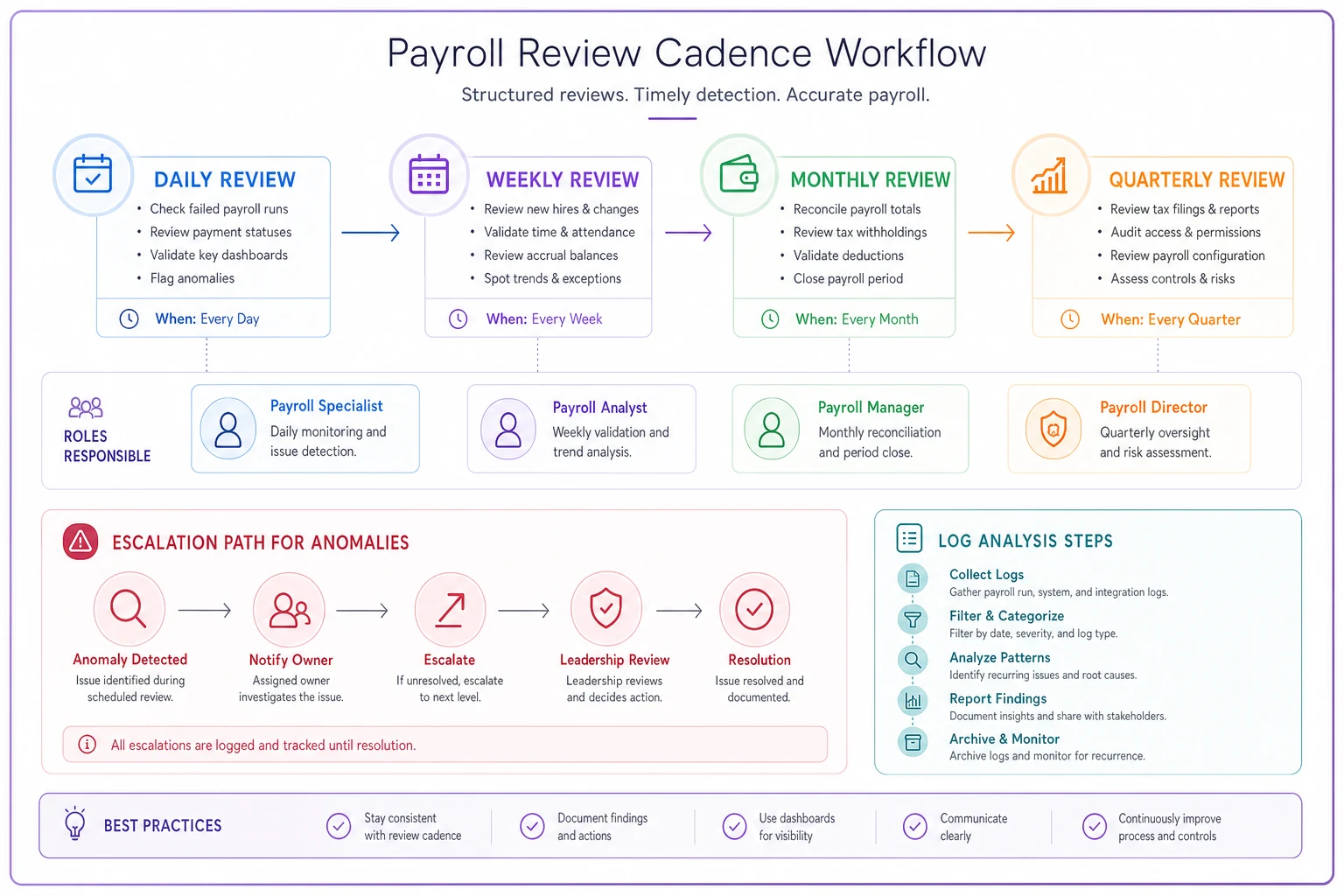
Use the visual to assign responsibilities and ensure reviews are happening on schedule.
Creating retention policies that balance compliance and practicality
Log retention requirements vary by regulation and industry, but payroll data faces some of the strictest requirements. SOC2 generally requires one year of logs readily accessible, with some industries requiring up to seven years.
Immediate Access (0-90 days): Keep detailed logs in your active system for quick investigation. This includes all user actions, system changes, and data modifications. Store these in searchable format for rapid incident response.
Archive Access (3 months - 1 year): Move older logs to cheaper storage but keep them easily retrievable. Compress files to save space but maintain search capability. You should be able to pull any specific day's logs within 24 hours.
Long-term Storage (1-7 years): Archive annual snapshots for compliance. Include user lists, permission matrices, and access certification records. These don't need to be immediately searchable but must be retrievable within 72 hours for audit requests.
Disposal Schedule: Document when and how you delete old logs. Complete deletion is rare—usually you'll keep summary data indefinitely while purging detailed logs after retention requirements expire.
Structure your retention around audit cycles. If you undergo annual SOC2 audits, keep two years of detailed logs—one for the current audit period and one for comparison. This lets auditors verify that issues identified in previous audits were properly remediated.
Consider the cost-benefit of retention. Storing seven years of detailed logs for a 50-person company might cost $200 monthly in cloud storage. The first compliance violation or fraud investigation will cost far more than years of storage fees.
Building access certification templates
Access certification—periodically verifying that users have appropriate permissions—is where most payroll security programs fall apart. It's tedious, time-consuming, and easy to rubber-stamp without real review. But it's also where you catch the accumulated permission problems before they become compliance failures.
Effective certification requires structured templates that make review efficient. Here's a practical quarterly certification process:
Manager Certification Template: Each manager receives a report showing their direct reports' payroll system access, specific permissions each person has, last login date for each user, and summary of recent actions performed.
Managers must explicitly confirm or deny each permission. "Sarah Thompson - Timesheet Entry: APPROVE/REMOVE" forces a decision. Include a notes field for context: "Approve - Sarah backs up Tom during his weekly client visits."
Role Owner Certification Template: The person responsible for each role (usually department heads) reviews everyone assigned to roles under their purview, whether role permissions match current job duties, any users with multiple potentially conflicting roles, and dormant accounts that haven't been used in 30+ days.
System Administrator Certification: IT or your system admin reviews all administrative and super-user accounts, service accounts and API access, any external system integrations, and password policy compliance and MFA status.
Executive Certification: Quarterly, executives should certify the overall RBAC model remains appropriate, segregation of duties is maintained, all high-privilege access is justified, and compliance requirements are being met.
Make certification as painless as possible. Pre-populate forms with current data. Highlight changes since last certification. Flag obvious issues like terminated employees with active access or people with conflicting roles.
Set deadlines and escalation procedures. If a manager doesn't complete certification within five business days, escalate to their supervisor. After ten days, automatically suspend the uncertified access. This sounds harsh, but it's the only way to ensure compliance without constant nagging.
Track certification completion rates and review common rejection reasons. If managers consistently remove certain permissions during certification, maybe those default role assignments need adjustment.
The operational reality of maintaining payroll RBAC
Building the initial RBAC model is straightforward. Maintaining it as your organization evolves is messy. Every new hire, promotion, department reorganization, or system upgrade potentially breaks your carefully designed access controls.
A mid-sized marketing agency learned this lesson painfully. They spent three months building a comprehensive RBAC model for their 75-person team. Six months later, after two acquisitions and a restructuring, their actual permissions looked nothing like their documented model. Their SOC2 audit identified 47 excessive permission violations and 12 segregation of duties conflicts.
The fix isn't more documentation—it's building RBAC maintenance into your operational workflows. When HR processes a role change, that ticket should automatically trigger a permission review. When someone joins a new department, their old department's access should expire after a transition period. When you add a new payroll feature, every role's relationship to that feature needs evaluation.
Modern payroll platforms with built-in RBAC engines make a massive difference here. Instead of manually tracking permissions in spreadsheets, the system enforces your model automatically. Role changes trigger permission updates. Certification workflows run on schedule. Audit logs capture everything without manual intervention.
But even the best systems need human oversight. Schedule monthly RBAC review meetings with HR, IT, and Finance stakeholders. Review upcoming organizational changes and their permission implications. Discuss any access requests that fell outside normal patterns. Plan for seasonal variations like year-end processing when you might need temporary permission elevations.
Create a simple change control process for RBAC modifications. Document who requested the change, why it's needed, who approved it, and when it should be reviewed. This paper trail becomes crucial during audits when you need to explain why certain permissions exist.
Building your payroll RBAC implementation plan
Implementing proper payroll role based access control doesn't happen overnight, especially if you're retrofitting an existing system. But you can make meaningful progress quickly with a staged approach.
Start with critical segregation. Identify your highest-risk permission combinations—usually payment authorization plus data modification—and separate them immediately. This might mean removing permissions from senior staff who've accumulated excessive access over time. Expect pushback, but compliance requirements are non-negotiable.
Next, implement basic logging and review. Even if your current system's audit trail is limited, start reviewing what you have weekly. Document what you review and what you find. This shows auditors you're taking control seriously, even if your technical controls aren't perfect yet.
Build your target RBAC model on paper before changing systems. Map every payroll function to specific roles. Document which roles should be mutually exclusive. Create your certification templates and test them with a small group. This preparation makes system implementation much smoother.
Consider a phased rollout. Start with new hires getting correct permissions from day one. Then migrate existing users role by role, starting with the highest-risk positions. This gradual approach lets you catch and fix problems without disrupting payroll operations.
If your current payroll system can't support proper RBAC, you face a difficult decision. You can try to layer additional controls on top—using workflow software for approvals, maintaining manual logs, conducting more frequent reviews. But this approach is labor-intensive and error-prone.
Modern AI-enhanced payroll platforms can automate much of this work, automatically enforcing segregation of duties, maintaining detailed audit trails, and running certification workflows on schedule. The efficiency gains often offset the migration costs within a year.
Start with a model that matches your actual operations, not some theoretical ideal. Build in the review and certification processes from the beginning. Maintain the system as your organization evolves. And recognize when manual processes are holding you back from proper controls.
Payroll role based access control isn't just a compliance checkbox—it's fundamental to protecting your business from both fraud and regulatory penalties. The investment in proper RBAC pays for itself the first time you catch an inappropriate access attempt or pass an audit without findings.
Most businesses that suffer payroll fraud or fail compliance audits don't lack security awareness. They lack systematic controls that prevent individual failures from becoming organizational disasters. Proper RBAC provides those controls, turning payroll from a vulnerability into a well-governed operational function.
Your auditors will notice the difference immediately. Instead of scrambling to explain who has access to what and why, you'll hand them a clean RBAC matrix, comprehensive audit logs, and completed certification records. That's the difference between passing compliance reviews and truly operating a secure payroll system.
Ready to simplify your payroll operations?
Join 2,000+ businesses using Payexly to reduce payroll overhead, ensure compliance, and enhance employee satisfaction.