


Most payroll-to-GL reconciliations don't fail because someone can't add. They fail because nobody agreed, in writing, what "matched" actually means. One person thinks a $2 rounding gap is fine. The next person opens a ticket over it. A third quietly plugs it into a suspense account and moves on. Three months later the clearing account has a running balance nobody can explain, and now finance is arguing with HR during close week.
This is a working SOP for the payroll to GL reconciliation process — the actual field mappings, the tolerance thresholds you sign off on, the exception playbook when something breaks, and where to put automation checkpoints so the reconciliation happens during the cycle instead of as a fire drill on close day.
Keeping this narrow on purpose. Not GL chart design, not journal templates, not tax deposits. Just the reconciliation itself, and how to make it repeatable enough that a new accountant can run it in month two without asking twenty questions.
Why the "obvious" reconciliation quietly rots
The pattern shows up constantly in small and mid-size finance teams. The reconciliation starts clean. Someone builds a spreadsheet in month one that ties the payroll register to the GL, line by line. It balances. Everyone moves on.
-
A new earning code — say, a referral bonus — gets added in the payroll system but never mapped to a GL account, so it lands in a default expense bucket.
-
Employer 401(k) match posts on a different date than the deduction, so timing creates a "gap" that isn't really a gap.
-
A mid-cycle termination triggers a manual off-cycle check that never flows through the normal export.
-
Someone rounds the gross-to-net at a different decimal place than the GL feed.
None of these are dramatic. Each one adds a few dollars — or a few hundred — of noise. And because there's no written rule saying which differences are acceptable and which are exceptions, every reconciler treats them differently. The reconciliation becomes a personality, not a process. When that person leaves, the whole thing goes dark.
The fix isn't a better spreadsheet. It's a canonical mapping table plus explicit tolerances plus a decision tree for exceptions. Those three things together are what make reconciliation survive turnover.
Step one: build the canonical field-level mapping
Before you talk tolerances, you need one authoritative table that says: this payroll field maps to this GL account, at this grain, netting against this counter-account. Not in someone's head. In a document.
Eliminate payroll errors and delays.
Payexly streamlines every payroll cycle ensuring accuracy and compliance.
- Automated payroll processing
- Real-time tax compliance
- Benefits & deductions management
No credit card required
A workable mapping has five columns at minimum: payroll source field, GL account, expected sign, aggregation grain, and the counter-account it should net against. Here's a slice of what that looks like in practice:
| Payroll source field | GL account | Expected sign | Grain | Nets against |
|---|---|---|---|---|
| Regular + OT gross wages | 6000 Wage Expense | Debit | Dept, pay period | Net pay clearing (2100) |
| Employer FICA | 6010 Payroll Tax Expense | Debit | Company total | Tax liability (2200) |
| Employee FICA withheld | 2200 Tax Liability | Credit | Company total | Net pay clearing (2100) |
| 401(k) employee deferral | 2300 401(k) Payable | Credit | Company total | Net pay clearing (2100) |
| 401(k) employer match | 6020 Retirement Expense | Debit | Company total | 2300 401(k) Payable |
| Health premium deduction | 2400 Benefits Payable | Credit | Company total | Net pay clearing (2100) |
| Net pay (direct deposit) | 2100 Net Pay Clearing | Debit | Batch | Bank (1010) |
The single most useful thing in this table isn't the account numbers — it's the grain column. A huge share of reconciliation confusion comes from comparing a company-total number against a department-level number and wondering why they don't tie. Wage expense usually needs to reconcile by department because cost centers care, but employer FICA can reconcile at company total. If you don't write the grain down, two reconcilers will pick different ones and both think they're right.
One thing worth calling out specifically: the net pay clearing account is your anchor. Every payroll cycle, that account should zero out once the bank draft clears. If it doesn't, something in your gross-to-net or your deduction mapping is off. A non-zero clearing balance is the loudest alarm in the whole reconciliation.
Step two: set tolerances you'll actually defend
A tolerance is a number you're willing to sign your name under. If you can't defend it to an auditor, it's not a tolerance — it's a guess.
The mistake most teams make is setting a single flat tolerance across every account — something like "anything under $50 is fine." That's lazy and it's dangerous. A $40 variance in a $2M wage expense is nothing. A $40 variance in a 401(k) remittance is a compliance problem. Tolerance has to scale to the account and its risk.
A practical tiered approach:
-
Zero-tolerance accounts — net pay clearing, tax liabilities, 401(k) and garnishment remittances. These must tie to the penny. Any difference is an exception, full stop. These accounts either move real money to third parties or create legal obligations, so "close enough" doesn't exist here.
-
Rounding-tolerance accounts — wage and tax expense lines, where multi-employee rounding legitimately accumulates. A defensible rule is the greater of $5 or 0.01% of the account balance per period. Anything beyond that is an exception.
-
Timing-tolerance accounts — accruals and employer match that post on a schedule offset from the deduction. The tolerance here isn't a dollar amount, it's a timing window. The difference is acceptable if it clears within one cycle; it becomes an exception if it carries into a second.
Write these down. Put actual dollar figures and percentages in the SOP. The whole point is that the tolerance is decided before the variance appears, not negotiated at 6pm on close day when someone's staring at a number they want to make disappear.
Log within-tolerance variances so small trends don't hide structural issues.
One thing teams that do this well tend to get right: they log every variance that falls inside tolerance too, not just exceptions. Sounds like overkill. But when a "within tolerance" rounding gap grows from $4 to $9 to $16 over four months, that trend means something structural changed — a rate table, a rounding setting, a new pay group. You only catch it if you're tracking the small stuff.
Step three: the exception handling playbook
When a variance breaks tolerance, the worst outcome is improvisation. Everyone invents their own fix, nobody documents it, and the clearing account fills with unexplained plugs. The playbook exists so the response is consistent regardless of who's running the reconciliation.
Structure it as a decision tree. For any exception:
-
Classify it first. Is it a mapping gap (a code with no home), a timing difference (right amount, wrong period), a data error (bad export, duplicate batch), or a real discrepancy (the numbers genuinely disagree)? These four buckets drive completely different responses, and misclassifying wastes the most time.
-
Mapping gap → don't plug it. Trace the earning or deduction code, add it to the canonical mapping table, and re-run. A plug here just hides the same problem next month.
-
Timing difference → document the expected clearing period, tag it, and hold. Don't adjust. The most common bad habit here is journaling around a timing difference and then double-counting when it self-corrects.
-
Data error → escalate fast, because a duplicated batch or partial export can mean real money moved incorrectly. Stop, confirm the bank side, and re-pull the source before touching the GL.
-
Real discrepancy → open a formal exception ticket, assign an owner, and set a resolution deadline tied to close cadence.
A short field example. A 90-person services firm had a recurring variance around $180 in their benefits payable account — every month, same ballpark, never quite the same number. The reflex was to plug it. When they finally ran it through the classification step, it turned out to be a mapping gap and a timing difference stacked on top of each other: a new dental plan tier wasn't mapped, and one carrier's premium posted a day into the next period. Two clean fixes — one mapping addition, one timing tag — and the variance dropped below $10 and stayed there. Around forty minutes a month of "what is this again" just went away.
Aligning the reconciliation to your close cadence
A reconciliation SOP that ignores close cadence is a document nobody uses under pressure. The reconciliation has to have checkpoints that land before the close deadline, not on it.
Map it to a typical close timeline:
-
Pay date + 1 (mid-cycle checkpoint) Confirm the payroll register total matches the funding draft. If funding and register disagree here, you've caught a data error before it ever touches the GL.
-
GL post + 0 (import checkpoint) As soon as the payroll journal imports, run the mapping validation. Every source field should hit its mapped account at the right grain. Unmapped codes surface here.
-
Bank clear (clearing checkpoint) Once direct deposits settle, the net pay clearing account should zero. Non-zero means an immediate exception.
-
Close − 2 days (reconciliation sign-off) Full field-level tie-out complete, all exceptions either resolved or documented with an owner and deadline. Nothing open goes into close silently.
Here's a simple workflow showing the checkpoints across the payroll-close timeline.
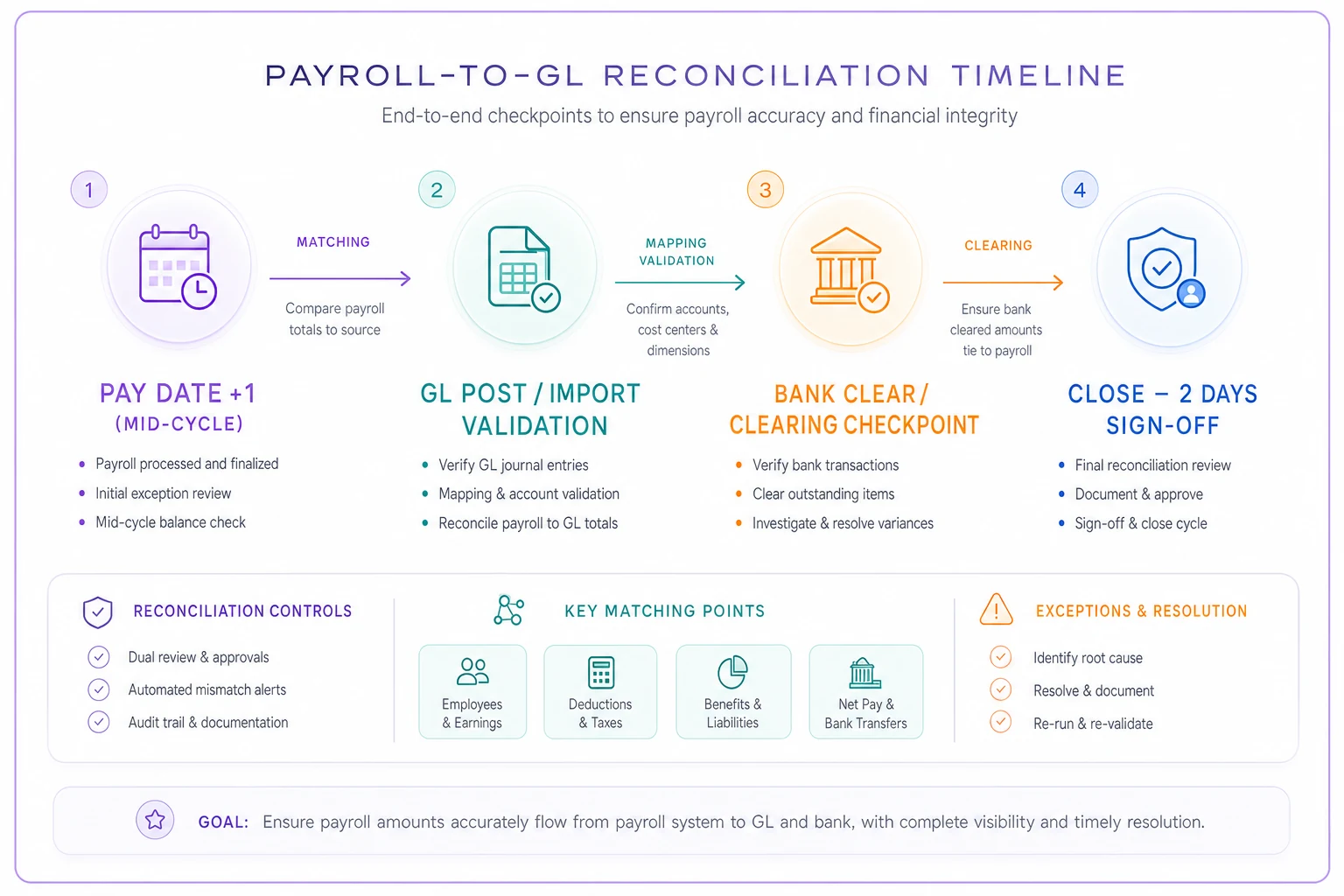
Spreading checkpoints across the cycle rather than stacking them at close comes down to cost. Exceptions are cheap to fix at checkpoint 1 and expensive at checkpoint 4. A funding mismatch caught the day after pay date is a phone call. The same mismatch discovered two days before close is a scramble, and now you're debating whether to accrue or delay.
Where automation checkpoints actually belong
Automation in reconciliation gets oversold. You don't need a system that magically closes the books. What you need is automation at the three points where humans are slowest and most error-prone: matching, flagging, and evidence capture.
-
Matching — comparing the payroll register against the GL journal, field by field, at the correct grain. This is mechanical work and machines don't get tired at line 400. An AI-assisted reconciliation layer can pull both sides, apply the canonical mapping, and match automatically — surfacing only the lines that break tolerance.
-
Flagging — applying the tiered tolerance rules and classifying likely exception type. Software that already knows account 2100 is zero-tolerance and account 6000 is rounding-tolerance will flag correctly every time, instead of relying on the reconciler to remember which rule applies where.
-
Evidence capture — automatically snapshotting the register, the journal, the tolerance applied, and the sign-off. This is the step humans skip when they're rushed, and it's the exact step auditors ask for first.
The point of automating these isn't to remove the accountant from the process. It's to hand them a short list of real exceptions instead of a 400-line tie-out where 390 lines were always going to match. Teams that use AI-powered operational software for this don't reconcile faster because they personally work faster — they reconcile faster because they stop touching lines that never needed a human.
When automation is worth it — and when it isn't
Automating the reconciliation makes sense when you're running multiple pay groups, have a stable canonical mapping, and your close cadence is tight enough that manual tie-out genuinely eats into deadlines. It also makes sense the moment reconciliation knowledge lives in one person's head — automation forces the rules out of their memory and into a system.
It's a bad idea when your mapping is still shifting every cycle. Automating an unstable mapping just means you'll get the wrong matches, confidently. Get the canonical mapping and tolerances solid first, on paper, for two or three cycles. Then automate. Automation amplifies whatever process you feed it — including a broken one.
Sign-off templates that hold up
A sign-off is worthless if it just says "reviewed by." The reconciliation sign-off should capture enough that someone eighteen months later — an auditor, a new controller — can reconstruct exactly what was checked and what was decided.
A tight sign-off block includes:
-
Period and pay groups covered — no ambiguity about scope.
-
Accounts reconciled and the tolerance applied to each — so the reviewer knows a rounding gap on 6000 was expected, not missed.
-
Clearing account status — confirmed zero, or explained if not.
-
Open exceptions with owner and deadline — anything unresolved, named, and dated.
-
Preparer and reviewer, with timestamps — separation of duties, on the record.
The accounts most teams forget to include in the sign-off are the zero-balance ones. If net pay clearing zeroed out, people skip mentioning it. But an explicit "clearing confirmed at $0.00" line is one of the strongest audit signals you can leave behind, precisely because it proves you looked.
A quick before/after from a real cleanup
A regional distributor with roughly 220 employees across four states was closing payroll reconciliation the way a lot of firms do: one senior accountant, one heroic spreadsheet, three days of tie-out every month, and a payroll clearing account carrying a slowly growing unexplained balance somewhere in the low four figures.
The cleanup wasn't complicated. They wrote the canonical mapping table — which surfaced two unmapped earning codes immediately — set tiered tolerances, and moved the tie-out to checkpoints spread across the cycle instead of one push at close. The unexplained clearing balance traced back to a stacked timing-plus-mapping issue on their multi-state tax accounts and cleared out over two cycles.
Reconciliation dropped from roughly three days to under a day, and the "who understands this spreadsheet" risk basically disappeared because the rules now lived in a document instead of one person's routine. The less visible change mattered more — for the first time, they could hand the reconciliation to someone new and trust the output.
Bringing it together
The payroll-to-GL reconciliation doesn't get reliable because you found a smarter formula. It gets reliable when three things are written down and agreed on before variances show up: a canonical field-level mapping with explicit grain, tiered tolerances you can defend line by line, and an exception playbook that classifies before it fixes.
Layer those against your close cadence, put automation only where it takes mechanical work off people, and capture a sign-off that proves what was checked. Do that, and the month-end scramble over a $412 clearing gap stops being a mystery. It becomes a classified exception with an owner, a deadline, and a paper trail — which is exactly what reconciliation was supposed to be all along.
The payroll-to-GL reconciliation doesn't get reliable because you found a smarter formula. It gets reliable when three things are written down and agreed on before variances show up: a canonical field-level mapping with explicit grain, tiered tolerances you can defend line by line, and an exception playbook that classifies before it fixes.
Layer those against your close cadence, put automation only where it takes mechanical work off people, and capture a sign-off that proves what was checked. Do that, and the month-end scramble over a $412 clearing gap stops being a mystery. It becomes a classified exception with an owner, a deadline, and a paper trail — which is exactly what reconciliation was supposed to be all along.
Ready to simplify your payroll operations?
Join 2,000+ businesses using Payexly to reduce payroll overhead, ensure compliance, and enhance employee satisfaction.