

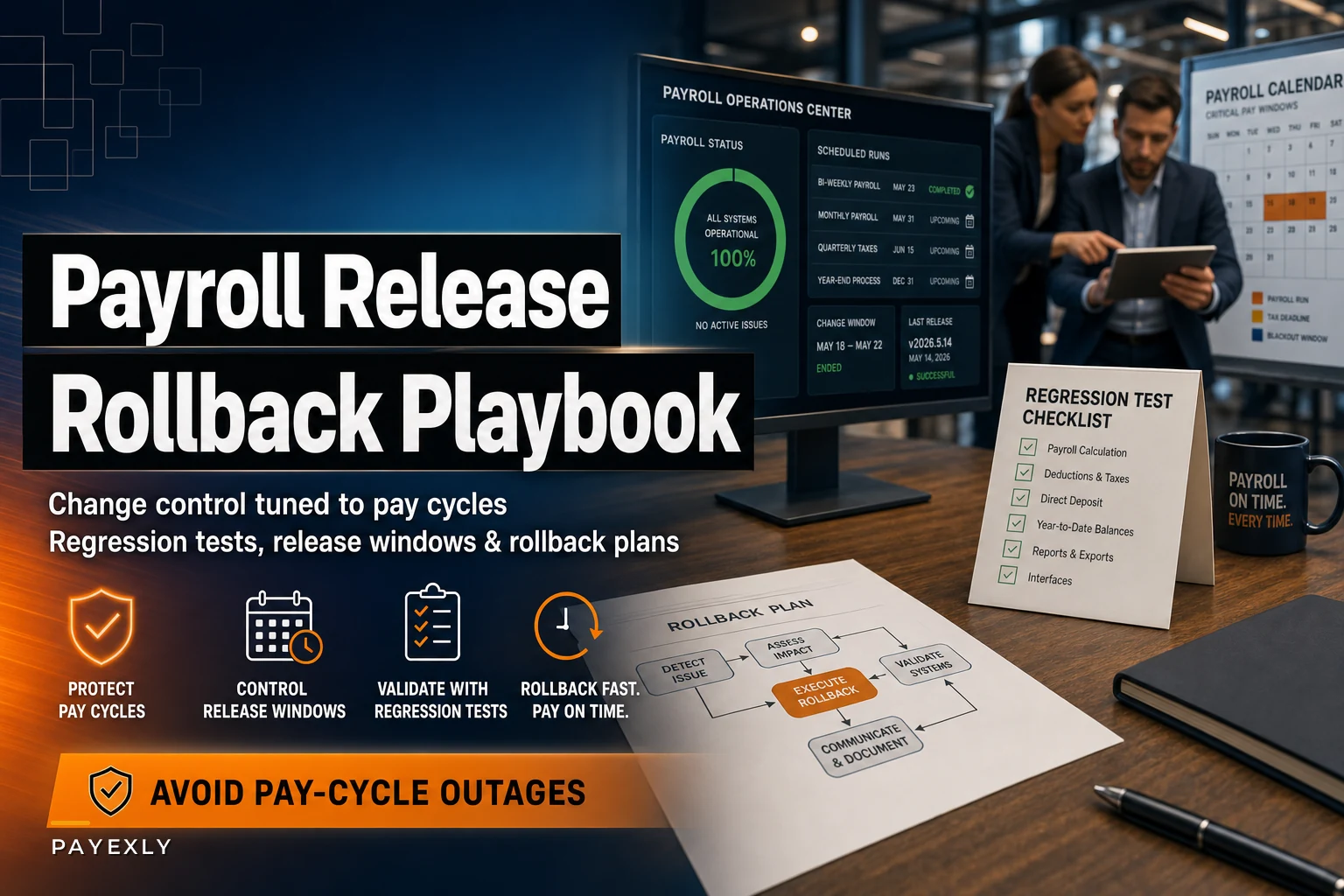

Payroll changes don't fail loudly at first. Someone updates a deduction code on a Tuesday, it passes a quick eyeball check, and then Thursday's run drops 400 people's health premiums or double-withholds 401(k) for the folks who happened to have a mid-year rate change. Nobody notices until paychecks land and the phones start ringing.
Most payroll teams treat config changes like data entry, not like software deployments. But a payroll change is a deployment. You're pushing something into a production system that moves money to real people on a fixed schedule you cannot slip. That combination — irreversible-ish output plus a hard deadline — is exactly why you need change control built around pay cycles, not around whenever someone had time to make the edit.
This is a playbook for the actual mechanics: what a change ticket should force people to answer, how to time releases against the cycle, who signs off, and how to get out cleanly when something goes sideways.
Why payroll change control breaks in the first place
The failure pattern is almost always about timing and blast radius, not the change itself. A tax table update is fine. A tax table update applied 18 hours before the run locks, with no regression pass and no rollback plan, is a landmine.
-
The output goes to humans on a fixed date. You can't roll back a direct deposit the way you roll back a bad web deploy. Reversals mean bank recalls, corrected filings, and a lot of apologizing.
-
Changes are often invisible until calculation. A wrong GL mapping or a mis-scoped earning code looks perfectly normal in the config screen. It only reveals itself when the engine runs against real employee data.
-
The person making the change is usually the person checking it. No second set of eyes, no independent test, no separation between "I built it" and "I approved it."
-
Cutoffs create pressure to skip steps. When the window is tight, testing is the first thing that gets dropped.
Teams that avoid outages aren't smarter or better staffed. They just refuse to let any change reach the production run without passing through the same gates every single time — even the "tiny" ones. The tiny ones are what get you.
The change ticket template that actually prevents mistakes
Most change tickets are useless because they describe what someone is doing without forcing them to think about what could break. A good payroll change ticket is really a risk interview disguised as a form.
Eliminate payroll errors and delays.
Payexly streamlines every payroll cycle ensuring accuracy and compliance.
- Automated payroll processing
- Real-time tax compliance
- Benefits & deductions management
No credit card required
Here's the minimum set of fields a payroll change ticket should cover:
-
Change summary — one plain sentence. "Add a new pre-tax parking deduction code for the Denver office."
-
Trigger / reason — new benefit, tax law change, correction, vendor requirement, org change. This matters because tax-driven and correction-driven changes have different rollback rules.
-
Affected population — how many employees, which entities, which pay groups. If the answer is "not sure," the ticket isn't ready.
-
Systems touched — payroll engine, GL feed, tax engine, benefits carrier file, time system. A change that touches downstream feeds is a different risk class.
-
Calculation impact — does this change gross, net, taxable wages, employer cost, or just a report? Be specific.
-
Retro implications — is this effective this period, or does it reach backward? Retro-dated changes are the single most common source of surprise corrections.
-
Test evidence required — which regression cases must pass before this ships.
-
Rollback method — exactly how you undo it, and whether "undo" is even possible after the run.
-
Requested effective date + target release window.
-
Approvers — pulled from the sign-off matrix, not chosen ad hoc.
The field that saves the most pain is affected population. When someone writes "adds a code, affects nobody until enrolled," you can right-size the review. When someone writes "recalculates taxable wages for ~380 employees across three states," everyone in the room knows this is not a rubber-stamp.
Worth calling out: teams that let people submit changes as free-text emails or Slack messages almost always have worse outage records than teams using even a basic structured form. Structure forces the questions that panic makes you skip.
Regression testing before every payroll release
You don't need a huge QA function. You need a fixed catalog of test cases that runs every time, plus a small set of scenario tests specific to the change.
Think of it in two layers. The standing regression set never changes — it's the same handful of representative employees you validate every release to prove the engine still does the basics right. The change-specific set is built from whatever this particular change touches.
Your standing regression set should include profiles like:
-
A single-state hourly employee with overtime
-
A salaried employee with a 401(k) percentage deferral
-
An employee with a garnishment or wage order active
-
A multi-state or reciprocity employee
-
Someone with a mid-period rate or status change
-
An employee at or near a Social Security wage base cap
-
A terminated employee getting a final check
The point is coverage of the calculation paths that break most often, not coverage of every human. Seven to ten well-chosen synthetic profiles catch the overwhelming majority of engine-level regressions.
Here's a simple way to structure what gets tested at each change size:
| Change type | Standing regression | Change-specific scenarios | Parallel/synthetic run | Second reviewer |
|---|---|---|---|---|
| Report-only / cosmetic | Skip | Light | No | Optional |
| New earning/deduction code | Full | Required | Recommended | Required |
| Tax table / rate update | Full | Required | Required | Required |
| Retro-dated change | Full | Required | Required | Required + finance |
| GL mapping change | Full | Required | Required | Required + accounting |
The rule that keeps teams honest: if a change alters net pay, taxable wages, or employer liability, it does not ship without a synthetic pay run comparing before and after. A before/after diff on your standing profiles will surface a broken calculation faster than any config review ever will.
Pro-tip: Keep your standing regression profiles documented and versioned so you can reproduce the same synthetic runs reliably.
A before/after diff on your standing profiles will surface a broken calculation faster than any config review ever will.
Release windows tied to the pay cycle
This is where almost everyone gets it wrong. Changes get scheduled based on when work gets done instead of where the change lands relative to the run.
-
Green zone — right after a run closes through several days before the next cutoff. Nearly everything should deploy here. You have time to test, catch fallout, and fix.
-
Yellow zone — the couple of days before cutoff. Only pre-approved, fully-tested, low-blast-radius changes. Everything needs a working rollback.
-
Red zone / freeze — from cutoff through the run and the post-run reconciliation. Nothing goes in except genuine emergencies with executive sign-off.
A concrete version for a biweekly cycle with a Monday cutoff and Thursday pay date: green zone is the Friday after payday through the following Wednesday. Thursday and Friday before the next cutoff are yellow. From Monday cutoff through Thursday's run, it's frozen.
The mistake that keeps happening: someone deploys a "quick fix" on Tuesday of run week because it "can't wait." It almost always could have waited. The change that genuinely can't wait until next cycle is rare, and when it's real, it should go through the emergency path — not sneak in as routine.
Freeze windows feel bureaucratic until the one time they save you from shipping a bad tax change 12 hours before locking the run.
The stakeholder sign‑off matrix
Sign-off breaks in two directions. Either everything needs five approvals so people route around the process, or nothing needs meaningful approval and risky changes slip through on one person's judgment. The fix is tiering approval to risk.
| Change risk | Payroll lead | Finance/Accounting | HR/Benefits | IT/Systems | Executive |
|---|---|---|---|---|---|
| Low (report, cosmetic) | Approve | — | — | — | — |
| Medium (new code, no retro) | Approve | Inform | Approve if benefit | — | — |
| High (tax, GL, retro, multi-entity) | Approve | Approve | Approve if applicable | Approve if integration | Inform |
| Emergency (in-freeze) | Approve | Approve | Inform | Approve if applicable | Approve |
Two things make this actually work. First, approvals are role-based, not name-based — if the finance approver is out, there's a named backup, so nothing stalls. Second, approval means someone reviewed the test evidence, not just the description. An approval on a high-risk change with no attached before/after diff should be treated as invalid.
The most common sign-off failure isn't a missing approval — it's approval theater. People clicking approve on things they didn't read because the process trained them to. Keeping the low-risk tier genuinely lightweight is what preserves attention for the changes that actually matter.
The emergency rollback plan
Rollback is where payroll differs hardest from normal software. Sometimes you truly cannot roll back — the money moved. So your plan has to distinguish between three situations:
-
Caught before the run locks. Easiest case. Revert the config, re-run your standing regression, confirm the diff is clean, proceed. This is why freeze windows and pre-run validation exist — to catch things while rollback is still cheap.
-
Caught after calculation but before transmission. You've run payroll, results are wrong, but nothing's been sent to the bank or filed. Rollback here means reverting the change, recalculating, and re-validating before you release the file. Painful but recoverable if you catch it in the reconciliation step.
-
Caught after money moved. Now you're not rolling back — you're correcting forward. Reversals, off-cycle corrections, adjusted filings, employee communication. This is closer to incident response than a code revert.
Your emergency plan needs to name, in advance:
-
Who declares an emergency and can invoke the in-freeze change path
-
The last safe rollback point in your cycle for each system — the moment after which "undo" becomes "correct forward"
-
The revert procedure per change type — a config revert is not the same as unwinding a completed retro adjustment
-
A communication tree for affected employees and finance
-
A parallel bank contact path for recalls and holds, because you do not want to be searching for that number at 4pm on pay day
A practical detail teams consistently forget: snapshot the config before the change, not just after. If you can't reconstruct the exact prior state, "rollback" becomes "rebuild from memory," which is how one bad change turns into two.
The diagram below shows a simple rollback declaration and execution workflow for payroll changes.
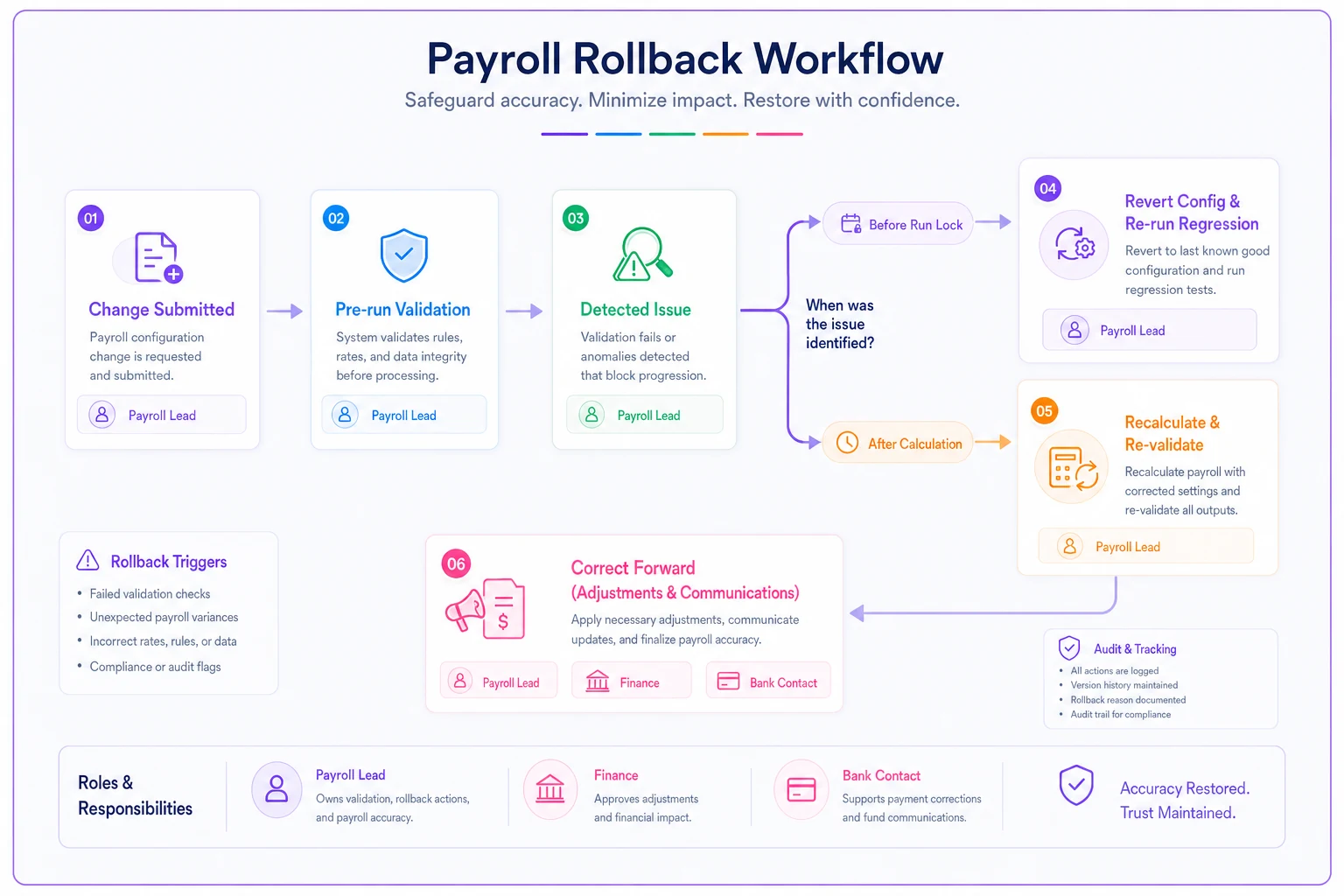
Keep the workflow simple and name owners for each step so the team can move quickly when an emergency is declared.
A real scenario
A regional home-services company with about 260 employees across four states rolled out a new supplemental life insurance deduction mid-year. The code was added Tuesday of run week — inside what should have been a freeze — because the benefits vendor wanted it live "this pay period."
No synthetic run, no before/after diff. The code was configured as post-tax but inadvertently reduced taxable wages for the enrolled group. Roughly 70 employees ran with understated federal and state withholding. It wasn't caught until a sharp-eyed accountant noticed the tax liability totals looked light during post-run reconciliation — after the file had already transmitted.
The cleanup ran across the next two cycles: corrected withholding, adjusted quarterly figures, and a fair amount of one-on-one explaining to employees about why their next check looked different. The cost — corrections, extra hours, amended filing work — landed somewhere in the low-to-mid four figures, plus a chunk of trust with the affected crew.
After that, they did three things: moved all vendor-driven changes to the green zone by default, required a before/after diff on anything touching taxable wages, and added the accountant as a mandatory approver on tax-impacting changes. The next mid-year benefit rollout went out clean, on a Friday, with a synthetic run attached to the ticket. No fallout.
Nothing about the fix was sophisticated. They just stopped letting urgency override the cycle.
When strict change control is overkill
Not every payroll shop needs the full apparatus, and pretending otherwise creates process that gets ignored.
When lighter is fine: a very small business running one pay group in one state, with one person who owns payroll end to end and a simple provider. A full sign-off matrix for a five-person company is theater. What that owner needs is the discipline of a before/after check on anything touching net pay and a habit of not making changes during run week.
When the full playbook earns its keep: multiple entities or states, integrated GL and benefits feeds, retro corrections happening regularly, or any situation where more than one person can touch config. The moment change authority is shared, you need the ticket, the tiers, and the freeze windows — because "who changed what, when, and did anyone check it" stops being answerable from memory.
Who should be careful going too heavy: teams that respond to an outage by adding six new approval steps. That doesn't reduce risk; it trains people to route around the process. Fix the timing and testing first. Approvals catch far fewer defects than a good regression diff does.
Pre‑release checklist
Run this before any payroll change reaches production:
-
[ ] Change ticket completed, including affected population and retro implications
-
[ ] Change scheduled in the green zone (or emergency path invoked with sign-off)
-
[ ] Standing regression set run against the change
-
[ ] Change-specific scenarios tested
-
[ ] Before/after diff produced for anything touching net pay, taxable wages, or employer cost
-
[ ] Config snapshot taken before the change
-
[ ] Rollback method documented and confirmed possible for this cycle stage
-
[ ] Required approvers signed off with test evidence attached
-
[ ] Downstream feeds (GL, benefits, time) confirmed unaffected or re-tested
-
[ ] Post-run reconciliation step assigned to someone who didn't make the change
Run this before any payroll change reaches production:
Closing thought
Teams that avoid pay-cycle outages aren't the ones with the fanciest tooling. They're the ones who decided that a payroll change is a deployment with human consequences and a deadline they can't move — and then built a process that respects both. Structured tickets force the right questions. A fixed regression set catches calculation breaks. Release windows keep changes away from the fragile part of the cycle. And a real rollback plan means the difference between a quiet revert and a two-cycle cleanup.
Start with the two rules that catch the most: no changes touching net pay during run week, and no such change without a before/after diff. Everything else in this playbook builds on top of those.
Teams that avoid pay-cycle outages aren't the ones with the fanciest tooling. They're the ones who decided that a payroll change is a deployment with human consequences and a deadline they can't move — and then built a process that respects both. Structured tickets force the right questions. A fixed regression set catches calculation breaks. Release windows keep changes away from the fragile part of the cycle. And a real rollback plan means the difference between a quiet revert and a two-cycle cleanup.
Start with the two rules that catch the most: no changes touching net pay during run week, and no such change without a before/after diff. Everything else in this playbook builds on top of those.
Ready to simplify your payroll operations?
Join 2,000+ businesses using Payexly to reduce payroll overhead, ensure compliance, and enhance employee satisfaction.