


Payroll tax deposits are weird. They follow rules that make zero operational sense for most businesses. Semi-weekly depositors have three banking days after their payroll date. Monthly depositors wait until the 15th of the following month. Then there's the $100,000 next-day rule that catches everyone off guard at least once.
The IRS collected $7.3 billion in employment tax penalties last year. Not because businesses tried to cheat—because their deposit workflows broke down at predictable failure points.
The deposit schedule trap that catches growing businesses
Most businesses stumble into deposit problems around $40,000 in monthly payroll. That's when you cross from monthly to semi-weekly deposits, but your operational workflows don't adjust.
A marketing agency with 12 employees hits this threshold in March. They've been depositing monthly for two years. Their accountant handles everything on the 10th of each month. Simple. Works fine.
Then April rolls around. They're now semi-weekly depositors based on their lookback period. Nobody notices. The accountant deposits on May 10th like always. The IRS sends a penalty notice in August for $1,847 plus interest.
This pattern repeats across thousands of businesses every quarter. The problem isn't understanding the rules—it's that deposit schedules don't align with how businesses actually operate.
Your payroll runs every two weeks. Your deposits are due within three banking days. But banking days exclude weekends and federal holidays. So a Friday payroll means a Wednesday deposit. Unless Monday is a holiday. Then it's Thursday.
Meanwhile, your accounting team reconciles monthly. Your bank notifications arrive daily. Your payroll processor sends confirmations immediately. Nothing syncs up naturally.
Why manual tracking guarantees eventual failure
I worked with a construction company that tracked deposits in Excel for six years without issues. Their office manager had a color-coded calendar, email reminders, and a backup person who double-checked everything.
Eliminate payroll errors and delays.
Payexly streamlines every payroll cycle ensuring accuracy and compliance.
- Automated payroll processing
- Real-time tax compliance
- Benefits & deductions management
No credit card required
Then their biggest project hit. Payroll jumped from $95,000 to $180,000 in one pay period. The $100,000 next-day deposit rule kicked in. The office manager flagged it correctly. Set the reminder. Told the backup person.
The deposit still went out two days late. The bank's ACH cutoff was 2 PM. The reminder fired at 3 PM. A $2,400 penalty for a timing issue that nobody caught until the workflow failed.
Manual systems work until they don't. And they always fail at the worst possible moment—when payroll is highest, staff is stretched, and one mistake costs thousands.
The reconciliation gap nobody talks about
Here's what really breaks deposit workflows: the gap between when you think the deposit cleared and when the IRS actually receives it.
You initiate the deposit Monday at noon. Your bank shows it pending Monday evening. It clears your account Tuesday morning. The IRS Electronic Federal Tax Payment System (EFTPS) shows it received Wednesday. But the IRS applies it to your account Thursday.
During that window, you have no real confirmation. Your bank says it went out. EFTPS says it's processing. Your accounting system shows the liability cleared. But until that IRS letter arrives months later, you're operating on faith.
A medical practice learned this the hard way. Their deposits showed as completed in their bank portal every time. Six months later, the IRS sent notices for eight missed deposits totaling $43,000 in liabilities plus $5,200 in penalties.
What happened? Their bank account number was off by one digit in EFTPS. The deposits bounced back to a suspense account. The bank showed them as processed. EFTPS showed nothing. The practice had no reconciliation process to catch the gap.
Building detection rules that actually prevent penalties
To automate payroll tax deposits effectively, you need detection rules at three critical points: pre-deposit, deposit confirmation, and reconciliation.
Pre-deposit triggers (2-3 days before due date):
-
Exact deposit amount from the last payroll run
-
EFTPS confirmation number from the last successful deposit
-
Bank account balance as of that morning
-
The actual deadline in both calendar and banking days
For a Wednesday deposit deadline, the trigger fires Monday morning. But if Monday is Presidents Day, it fires the previous Friday. Your trigger logic needs to calculate backwards from the deadline accounting for the full holiday schedule.
The alert should include:
Deposit confirmation checkpoints (day of deposit):
-
Bank initiation (T-0 hours)
Did the payment instruction leave your system?
-
Bank acceptance (T+2 hours)
Did the bank accept the ACH instruction?
-
EFTPS acknowledgment (T+24 hours)
Did EFTPS receive the funds?
Each checkpoint needs its own alert threshold. If bank initiation doesn't happen by 11 AM, escalate immediately. If bank acceptance doesn't show by 2 PM, you need a same-day wire backup plan. If EFTPS doesn't acknowledge within 24 hours, something is systemically wrong.
This diagram shows the detection and confirmation flow.
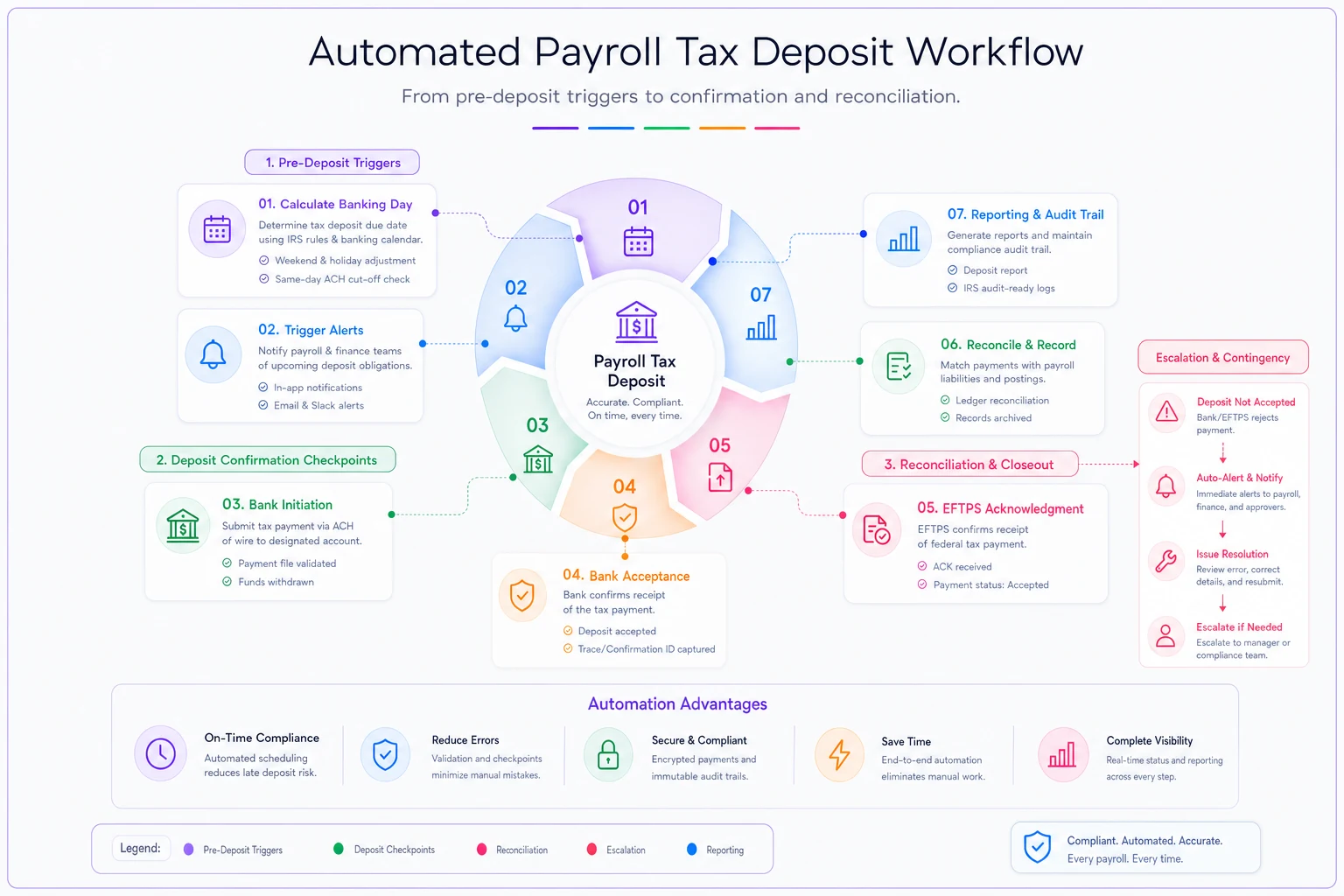
Set alerts based on banking days, not calendar days, to avoid holiday errors.
If bank initiation doesn't happen by 11 AM, escalate immediately. If bank acceptance doesn't show by 2 PM, you need a same-day wire backup plan. If EFTPS doesn't acknowledge within 24 hours, something is systemically wrong.
Sample alert thresholds that scale with your operation
Small businesses ($30k-100k monthly payroll) need different thresholds than larger operations. Here's what works across different scales:
| Payroll Size | Pre-deposit Alert | Confirmation Window | Escalation Time | Contingency Trigger |
|---|---|---|---|---|
| Under $30k | 2 banking days | 48 hours | Same day | Manual override |
| $30k-$100k | 3 banking days | 24 hours | 2 hours | Backup approver |
| $100k-$500k | 4 banking days | Same day | 1 hour | Auto-wire backup |
| Over $500k | 5 banking days | Real-time | 30 minutes | Multiple channels |
Notice how the windows compress as dollar amounts increase. A missed $500k deposit costs more in penalties than most small businesses pay in monthly payroll. The automation needs to match the risk.
The contingency cascade that saves you from penalties
When a deposit workflow fails, you need automatic contingency escalation. Not emails that might get missed. Not Slack messages during lunch. Actual operational contingencies that execute without human intervention.
Level 1: Primary deposit fails (T-0) The system attempts the primary ACH deposit through your standard bank connection. If this fails—insufficient funds, connectivity issue, wrong credentials—it immediately triggers Level 2.
Level 2: Backup payment method (T+2 hours) Automatically initiate through your backup EFTPS enrollment or secondary bank account. Most businesses never set up a backup EFTPS enrollment. That one oversight alone accounts for a huge chunk of avoidable deposit penalties.
Level 3: Same-day wire (T+4 hours) If both ACH attempts fail, the system generates a wire instruction with all required details. For amounts over $100k, this needs to execute before 3 PM Eastern to meet next-day requirements.
Level 4: Manual override with audit trail (T+6 hours) Send simultaneous alerts to three people: CFO, controller, and backup approver. Include phone calls, not just emails. Document every action with timestamps.
Real reconciliation workflow from a business that eliminated penalties
A distribution company with 200 employees completely eliminated deposit penalties after implementing this reconciliation workflow:
Daily (Every banking day at 9 AM):
-
Pull EFTPS payment history via API
-
Match against expected deposits from payroll system
-
Flag any deposits in "pending" over 48 hours
-
Generate exception report for amounts over $10k
Weekly (Every Monday):
-
Reconcile bank statements against EFTPS confirmations
-
Verify deposit schedule changes based on lookback calculations
-
Project next quarter's deposit requirements
-
Alert on any schedule transitions (monthly to semi-weekly)
Monthly (5th business day):
-
Full three-way reconciliation
Payroll system → Bank → EFTPS
-
Calculate penalty exposure for any late deposits
-
Adjust Q3 estimates if deposits exceeded $50k
-
Update deposit schedule triggers for next month
Quarterly (Before each 941 filing):
-
Audit trail review of all deposits
-
Verify total deposits match 941 liabilities
-
Document any discrepancies before filing
-
Prepare penalty abatement letters if needed
This company went from roughly $18,000 in annual penalties to zero in about six months. The reconciliation caught fourteen potential failures before they became penalties.
The automation stack that handles the bulk of deposits without human intervention
Modern payroll tax automation requires four connected systems working together.
Your payroll platform calculates the liability. Most businesses stop here, assuming the payroll company handles deposits. They don't. They calculate what you owe and maybe remind you when it's due.
Your banking platform needs API access for balance checking and payment initiation. Not just read-only access—full payment capabilities with proper security controls.
EFTPS integration pulls confirmation data and validates successful deposits. Without this, you're operating blind until penalty notices show up months later.
The orchestration layer connects everything. This is where AI-powered automation actually adds real value. Instead of rigid if-then rules, it learns your deposit patterns, flags anomalies, and surfaces potential failures before they become problems.
A retail chain with forty locations reduced their payroll tax operations from three full-time people down to roughly half of one person's time. Their system handles:
-
Automatic deposit calculations after each payroll run
-
Intelligent scheduling based on banking days and holidays
-
Multi-level approval workflows for amounts over $50k
-
Real-time reconciliation across all entities
-
Predictive alerts when deposit patterns change
The automation doesn't replace human judgment. It eliminates the repetitive work that leads to mistakes when people get overwhelmed.
When deposit automation creates new problems
Not every business should fully automate payroll tax deposits. The complexity sometimes creates more risk than it solves.
Businesses with irregular payroll schedules—construction companies with project-based pay, restaurants with high tip variations, seasonal operations—need human oversight. The automation can handle routine deposits, but exceptions require manual review.
Companies under IRS audit or payment plans need careful control. Automation could trigger additional scrutiny if deposits don't match expected patterns. Better to handle these manually with full documentation.
Startups with volatile cash flow shouldn't automate deposits until their banking relationships stabilize. One overdraft during a critical deposit could trigger both bank fees and IRS penalties.
The quarterly review that keeps automation working
Even solid automation needs quarterly tuning. Tax regulations change. Deposit thresholds adjust. Your business grows or contracts.
Every quarter, review five key metrics:
-
Deposit success rate
Should be above 98% for automated deposits
-
Average confirmation time
Target under 24 hours from initiation to EFTPS confirmation
-
Escalation frequency
More than 2% suggests your thresholds need adjustment
-
Reconciliation exceptions
Pattern analysis reveals systematic issues
-
Penalty exposure
Calculate worst-case scenario if automation failed completely
A manufacturing company discovered their automation was depositing correctly but assigning deposits to the wrong quarter in EFTPS. They caught it during quarterly review, before the IRS noticed. A five-minute fix prevented around $12,000 in penalties.
Building your implementation roadmap
Start with reconciliation, not automation. Map your current deposit workflow first. Document every step, every handoff, every decision point. You'll find gaps you didn't know existed.
A professional services firm thought they had deposit workflows figured out. The mapping exercise revealed their backup person hadn't had EFTPS access for six months after a role change. One sick day could have triggered penalties.
Next, implement alerts without automation. Set up manual triggers at each checkpoint. Run this for one quarter. Track every alert, every escalation, every near-miss. This becomes your automation specification.
Then automate the most stable elements first. Usually that's the pre-deposit calculation and scheduling. Keep manual approval for actual payment initiation until you trust the system completely.
Finally, layer in intelligent automation—predictive analytics, anomaly detection, self-healing workflows. By this point, you've got enough operational data for AI-assisted tools to actually improve your process, not just digitize it.
Making payroll tax deposits invisible to your team
The end goal isn't sophisticated automation for its own sake. It's making payroll tax deposits invisible to your operational team. They should run like electricity or water—reliable, consistent, unnoticed until something goes wrong.
Good automation means your team never thinks about deposit deadlines. They run payroll. Deposits happen. Confirmations arrive. Reconciliations complete. The only time anyone looks at the process is during quarterly reviews or when changing banks.
Getting there requires thoughtful setup, careful monitoring, and ongoing adjustment. But once it's working, you've eliminated one of the most common sources of preventable penalties in business operations.
The real value isn't just the time saved or penalties avoided—though both matter. It's the mental space it creates for your team to focus on actual work instead of compliance calendars. When deposit workflows run themselves, your finance team can focus on cash flow optimization instead of watching due dates.
That's when automation stops being a nice-to-have and becomes a genuine operational advantage.
Ready to simplify your payroll operations?
Join 2,000+ businesses using Payexly to reduce payroll overhead, ensure compliance, and enhance employee satisfaction.